
Safe Social Media: Twitter
 The first installment of the Safe Social Media Series is on the three year old web service and recent internet sensation, Twitter. My accolades for Twitter are not unknown, however that doesn’t mean you shouldn’t exercise some caution in using it. Like any platform that allows you to speak freely, you should consider these tips when using Twitter.
Let me start off by saying that for any of the technologies mentioned in this series, it’s not the platform’s fault if you get in trouble, it’s yours. In a world where social media permeates many aspects of our lives, it’s becoming more apparent that we are each our own brand. We all have an image, and all brands and images need to be maintained. If you want to come off as foul-mouthed or unfiltered to the general public, this series isn’t for you. But for most of us, there are some things we’d rather keep to ourselves.
That being said, the appeal to Twitter for most people is the ability to post your random thoughts- that means funny, weird, interesting, and even frustrating things. It’s human nature to vent, and what better way to vent than tell the few hundred people that follow you on Twitter. However, before you post you really need to think to yourself, Who don’t I want to see this? People have lost their jobs over Twitter, or lost opportunities. I consider myself lucky that I haven’t, considering I’ve vented about clients in the past. Being unfiltered can be liberating, but it can be costly. Keep in mind that unless your updates are protected, anyone with or without a Twitter account can see then. That being said…
Twitter is not for every random thought.
It is for promoting yourself, sharing links, helping people out, and staying updated. If you think that what you’re saying can be the least bit incriminating, it’s probably best left unsaid. If you can’t filter yourself, you can always filter who views your profile.
Mild Protection – Block Users
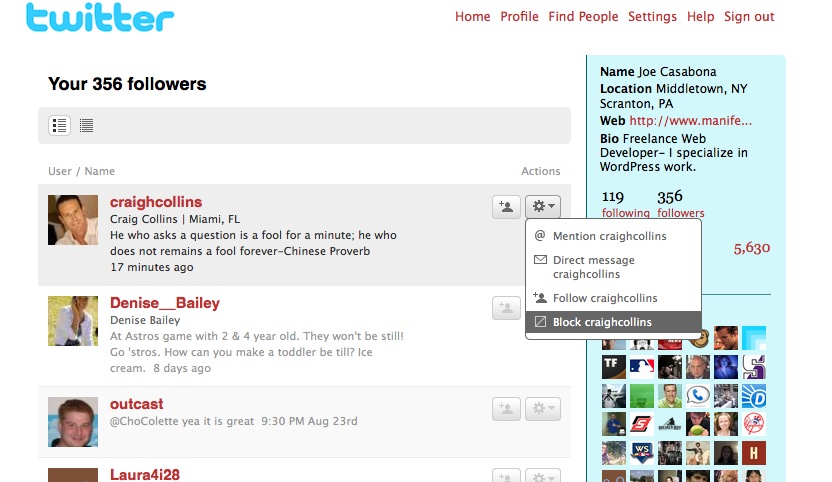
If you don’t mind most people following you, but want to filter some bad eggs, you can always block people. Maybe you don’t like what they have to say, or they seem creepy. Either way, go to your followers and click the cog button shown in the screen shot. Remember though, unless your updates are protected, people without logins can view them.
Hardcore Protection – Protected Updates
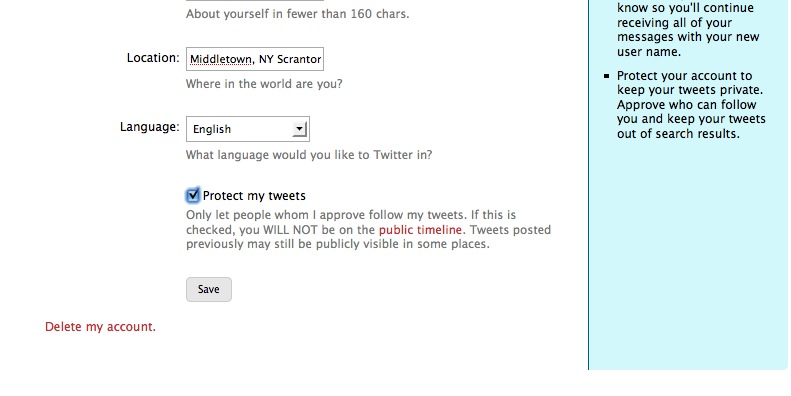 If you’d prefer to control your audience a little more, you can also protect your tweets. Go to Settings and scroll to the bottom and check the box pictured above. This will make it so when people want to follow you, they send a request, and you approve them before they see your tweets. This is the only way to completely control who sees your updates.
No matter what you decide to do, it’s always best to be a bit weary of what you’re putting out on the internet. If you don’t want your boss, teacher, coworker, or peer seeing it, don’t post it.

What can I do with Twitter?