Over the years, I’ve posted tours of my desk. I try to update it 2-3 times per year when significant hardware changes happen. Since the last post (Fall 2022), I’ve made several changes to light positioning, I/O devices, and added one big piece to the puzzle.
The word ‘Control’ evokes various thoughts and emotions, many of which are negative. Control is often associated with an excessive desire to dominate or dictate every aspect of a situation.
The bad guys in movies and in real life desire control at almost any cost.
Emperor Palpatine in Star Wars said the only way to improve life in the galaxy was for him to seize control. Thanos said the only way to save the universe was to control the population by controlling the infinity stones.
Countless dictators and wannabe dictators have justified taking control because they’re the only ones who can save us.
It sounds micro-managy, almost authoritarian when you say, “I want to be more controlling.”
But Control at the right scale is super important. If you don’t control your car, bike, or other vehicle, for example, you will end up hurting yourself or someone else.
In thinking about my next yearly theme, a recent conversation I had with my therapist was top of mind. I told her that I didn’t feel like I was in control of anything.
Not my health. Not my money. Not my time or schedule.
As you’ll see when I grade 2023: The Year of Budgets, it was a pretty tough year. I don’t think I fared well.
When I watch my kids play Super Mario Bros (the NES version, natch), they just kind of mash buttons and wonder why they died.
2023 kind of felt like that for me. I wasn’t doing a good job of controlling myself — which is why 2024 is The Year of Control.
It’s time for my 15th annual Favorites post. It’s always fun reviewing my old favorites, seeing how the picks have evolved, and realizing how much more verbose I’ve gotten in describing them.
One notable change — I’ve added “Video Game.” This might be ephemeral, as I don’t play video games SUPER often, but this year, there’s definitely one.
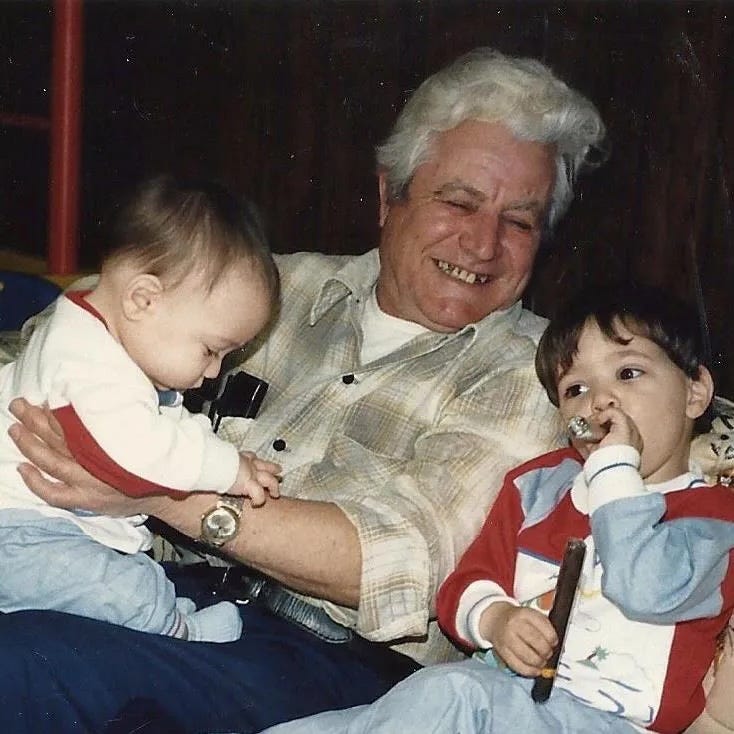
When I was in 5th grade, I had to do a report on a family member who immigrated to the United States.
My maternal grandfather, Louis (Luigi) “Pop” Addorissio, was the only family I knew who did that. He came to the US from Italy in 1949, at the age of 19.
I sadly don’t remember any of the questions I asked, or the answers he gave, and that report is lost to the annals of history.
I did manage to ask him one question when I was about 20 years old about what it was like growing up in Italy during WWII. He made a comment about how Mussolini actually did a lot for the country, but he, “got in with the wrong crowd.”
The wrong crowd indeed, Pop.
As an aside, something incredibly interesting about Italian immigrants in the 1940s-1950s was that they were very focused on “becoming American” (likely due to prejudice against them). Pop learned English ASAP, and didn’t teach his kids Italian because he felt it would be a hinderance to them.
Me and my brother Phil, with Pop and my “first cigar” circa 1989
He sadly passed away in 2009, and one of my biggest regrets is not capturing more of his stories. I can imagine myself, standing outside with him, both of us smoking cigars (something I got into thanks to him).
Then, I would probably just asked questions and wrote down the answers. But today, I’d bring my Zoom H5 recorder over, with a couple of microphones, and capture our conversation that way.
Storytelling is such an important part of the human experience?—?something that holds together the very fabric of society. It can motivate crowds to act, and it can keep familial traditions and legacies.
That’s why I’m so excited about the new product we’ve launched at RSS.com HQ: gift cards.
RSS.com Offers Gift Cards for Podcasting
You likely have a friend who’s said, “I need to start a podcast.” And I know from experience that many folks don’t know where to start.
These gift card are prefect for them, as well as the aspiring marketer, content creator, and storyteller.
But beyond that, they’re also perfect for the family member, friend, or loved one whose stories you want to live on.
In a world where we’re so focused on the viral, short form, and ephemeral, we could use a more of this type of content. The stories that can’t and won’t always get told, unless we capture them and pass them on to future generations.
I would have loved for my kids?—?including his namesake, my son Louis?—?to hear Pop’s stories, in his own words. Now they have to settle for the very few I have, and a pretty poor impression.
If you’re looking for a unique gift for the person in your life whose stories need to be heard, I strongly recommend you check out RSS.com’s gift cards.
Disclosure: I am the Evangelist for RSS.com…but this is still a cool, one of a kind gift.
Something I’ve been toying around with a lot more since the iPhone 15 Pro came out is the Action Button.
Right now on my phone, it simply adds a new task to Things 3 via Shortcut.
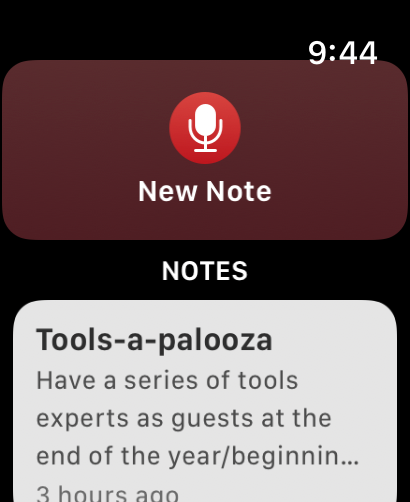
But on my Apple Watch Ultra, I always felt the perfect use case was to dictate a note?—?also via Shortcut, where I explicitly have the Dictate Text action. Otherwise, the watch inexplicably defaults to the swipe keyboard.
Press a button, say some stuff, and know it will be safely stored in my favorite notes app, Bear.
This shortcut has great utility in the car as well. I can just shout, “New Note” into the void and capture an idea.
But there’s one problem: Bear Notes doesn’t support Shortcuts on Apple Watch.
It feels pretty wild to me, because their Apple Watch app is well-thought out, if not good.
But alas, when I try to use the new note Shortcut, I get an error message because Bear Notes presumably doesn’t support Shortcuts on Apple Watch.
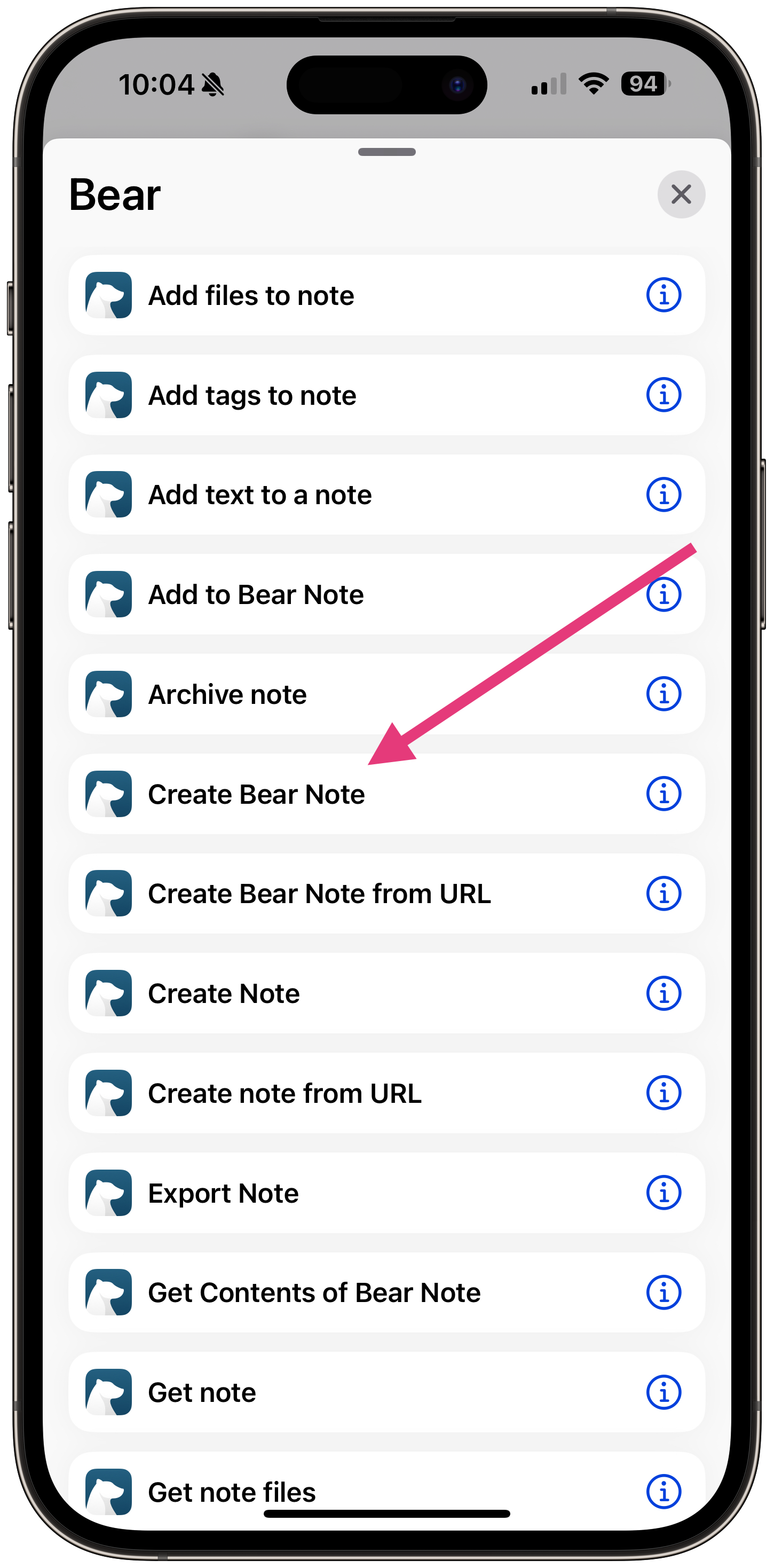
However, while writing this article, I made a discovery. Bear has 2 ways to create notes: “Create Note,” and “Create Bear Note.”
The Create Bear Note Shortcut action works on the Apple Watch.
That’s a huge relief, as my workaround was:
Make the note using Apple Notes
Create a Shortcut that imports all Apple Notes to Bear, then delete the Apple Notes
Create an Automation to run that Shortcut every time I open Bear.
Apple sometimes automatically creates “legacy actions” for apps that are not under our control. We recommend avoiding these actions: Create Bear Note, Create Bear Note from URL, open Bear Note, and Search in Bear.
SO they want us to use the “Create Note” action?—?even though it doesn’t work on Apple Watch.
I’m not sure what the moral of the story is. Use Create Bear Note at your own peril?
I’ve reached out to Bear support and will update this if I find out anything new!
You want to build better systems, but you don’t know where to start.
That ends today. The Solo Systems Starter Kit will give you 4 systems every solopreneur needs to run a less chaotic business, the exact tools to create those systems, and automations + AI prompts and skills to get you to a calmer, more reliable business faster.