What shaving my beard has to do with podcasting

This weekend, I shaved my beard?—?everything except the mustache?—?for my Halloween costume. My daughter is being Wednesday Addams, and we…

This weekend, I shaved my beard?—?everything except the mustache?—?for my Halloween costume. My daughter is being Wednesday Addams, and we…

One of my biggest frustrations as an automator is reconciling iOS?—?my preferred mobile platform?—?with web apps.
Recently I found myself thinking about early Cartographers and how they managed to create accurate maps. They’d use rudimentary tools, landmarks, and their own observations.
In-fact, distances were often estimates due to lack of accurate measuring tools. That caused a lot of problems for travelers, would rely on those distances and measurements to get to where they wanted to go.
As we know today, being slightly off over a long distance could land you in a dramatically different place. Just ask Christopher Columbus.
Today, of-course, we don’t have that problem. With most of the world mapped out, and those maps accessible at any moment with real time directions, accurate maps are commonplace. Modern cartographers are focused on creating advanced, interactive digital maps.
It’s not that simple when you’re starting your own business. Sure, you might have a rudimentary map. But there’s no set of directions you can follow to have a successful business…despite what Twitter bros tell you.
That’s why you need a great cartographer for your business — someone (or a group of someones) who can use their observations and experience to help you create the map that will get you to where you need to be in your business.
Chris Lema, CaboPress, and all the great people I’ve connected with there have been those cartographers for me.
As I reviewing my continually dwindling LinkedIn Learning royalties, I noticed that my latest course is officially out: Generative AI for Podcasters.
I had a blast creating this course, and am hopeful it will be a boon to my recurring revenue.
Something I didn’t really discuss in the course is how I’m using AI to assist in research and fact checking.
That’s mainly because for a long time, I didn’t properly script my shows (I still don’t fully script most of them). But I’ve been leaning more into full, or fat, outlines, where most of what I want to say is in the outline.
I’ve also been integrating more stories and seemingly unrelated facts (that I tie back in) into my writing.
So I’ve been using AI to do two things:
This means I’ll have Ulysses, my writing app, up on the left, and Chat GPT-4 via Raycast up on the right:
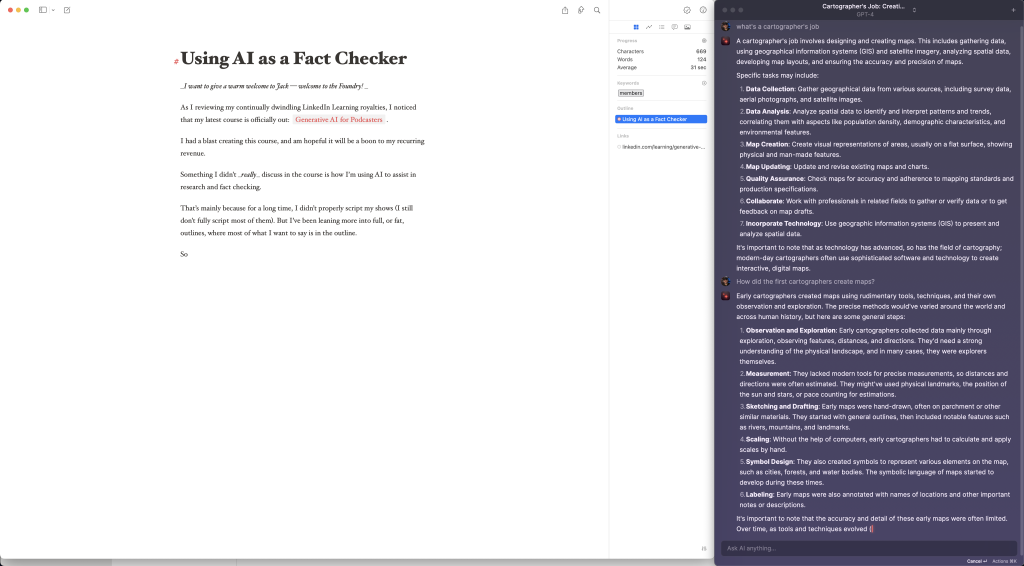
It’s been a workflow I’m greatly enjoying, and my use of Chat GPT has gone way up.
I think there are a couple of reasons for this.
First, GPT-4 is considerably better than 3.5. The answers you get are more in-depth, better organized, and it seems, less susceptible to hallucinations. It routinely reminds me of its limitations, especially around current events.
My confidence is also greater because I’m not asking it to come up with something for me, or asking it for info on topics I know nothing about. I have a thought on something, and I’m using it to confirm my understanding and my own memory.
A great example of this when I wrote about using the Socratic Method. It has been a while since I learned about the Socratic Method and the life of Socrates — nearly 20 years — so I used Chat GPT-4 to make sure I had the facts right, as well as get some more context around the topic for me to use in a blog post.
I also used it to write a primer on generative AI. In that instance, I actually had it write 700ish words on what generative AI and LLMs are. Here’s the full prompt for that one:
Write a 700 word blog post answering the question, "What is generative AI?" You should include a basic definition, a definition of large language models, some common (and maybe uncommon) use cases, and some good tools. You should also mention how important prompts are in garnering good results.
What I got back was helpful and factually accurate. I ended up adding about 300 words and taking away 150ish, but I got to where I needed to be — especially since it wasn’t core content.
As a podcaster, this can help you with scripts and supplementary blog posts, or even to fact check this are said on your show.
This can help enhance your content without adding a ton more time to the research phase.
This is definitely one of my favorite uses for AI. I hope you find it helpful!
I want to give a warm welcome to Jack — welcome to the Foundry!
I’m working on a longer form series on how I create solo episodes, which will likely go on Medium. But I’d like to publish the parts here, as I write them.
As the baseball season winds down (for Yankee fans, anyway), I find myself thinking about the process of the sport as it relates to publishing my podcast.
Like many things in life, both have a number of moving parts and contexts in which you want to change your approach.
For example, in baseball, you have pitching coaches and hitting coaching. More granularly, they also have infield coaches and outfield coaches.
You don’t want your pitcher to take the same throwing approach as your right fielder.
The same thing goes for podcasting — I usually publish interviews for How I Built It. But once a month or so, I’ll do a solo episode, and the process is quite a bit different.
For one, I’m not scheduling with anyone, so I don’t need to find a set time to record. I’m also not doing a pre-interview…but that research is replaced with topic research.
Finally, I don’t usually send solo episodes out for edit.
I’ll cover every aspect of the solo show here eventually, but today I want to talk about recording and editing.

One of the forcing functions for me to try new and interesting things is the fact that I’m a LinkedIn Learning instructor.
I thought I’d switch things up this week and tell you what I’m working on, since we’re at the halfway point of the month.
If you like this sort of format, let me know!
First up, it’s iPhone pre-order day! I got the iPhone 15 Pro Max in Titanium Blue, the Ocean Blue Ultra watch band, and…a Mac Mini! That’s a story for another newsletter.

One of my least favorite subjects in college was Philosophy. I was a hard science major, after-all, and philosophy was a boring waste of time.
I also went to a Catholic, liberal arts college where I had to take at least 3 philosophy courses?—?a requirement for every student.
Luckily, there were a few teachers who made Philosophy very easy by basically making them history lessons, where I just had to regurgitate the basics.
But like most ill-conceived, hard opinions one forms in their youth, 20 years later I’m kicking myself for two things:
In the past few years, thanks in part to Ryan Holliday, I’ve gotten more interested in philosophy?—?primarily the Stoics.
But I’m also learning, surely not for the first time, how impactful ancient philosophy has been on government, society, and leadership.
As I read some of Holliday’s work and listen to political podcasts, lots of names come up that are vague memories from an era where I thought I already knew everything I needed to know.
It’s a shame, really, because the one philosopher I remember the most about is Socrates, who had a core belief that true wisdom comes from recognizing our own ignorance.

And today, I’m drawing from his teachings to better deal with conflicts in real life, and online.
Lately I’ve been thinking a lot about Socrates with respect to how I respond to spammy, unscrupulous, or just plain disagreeable people online.
My approach has generally been curt, direct, somewhat mean responses. But after getting a taste of my own medicine recently?—?I’ve been doing more cold outreach to build relationships that hopefully turn into professional engagements?—?I started to wonder if there’s a better approach to dealing with those kind of messages.
For what it’s worth, I don’t think I’m being spammy, unscrupulous, or pushy. But that’s really in the eye of the beholder.
I feel like a better approach might be the Socratic Method. Here’s how Chat-GPT distills it:
Socrates would use this approach in debates to get people to contradict themselves, while at the same time getting them to examine their own understanding of the subject at hand.
So how could I use this online for spammy, unscrupulous, or just plain disagreeable people?
My instinct has always been to fire back at people who act a certain way online?—?to “burn” them and move on.
As I write this, it already kind of feels like I waste my time…because the truth is very few people have been convinced by a tweet to change their mind.
But the Socratic Method allows for the interlocutor (someone who engages in debate?—?I just learned that word!) to give their own answers, potentially contradict themselves, and hopefully change their mind/approach.
I mean…it’s kind of like Inception.
For example, someone recently reached out to include me in a “Top 15 Inspiring Podcasters” article for a well-known publication?—?which is an honor, until they told me they want $800 for inclusion.
I responded by saying, “So it’s more like 15 Podcasters who paid us to be listed.”
That’s kind of an asshole response, even if it is true. In other words, it’s not changing hearts and minds.
If I had taken the Socratic approach, the conversation may have gone something like this:
Joe: “Does this imply I’m included in the article already, and I’d pay for a higher slot, or that I’d pay to be in the article? If it’s the latter, what happens if you don’t find 15 people to pay you?”
Writer: “You will have to pay in order to get featured in this article. This is paid PR. We do research and have strict criteria for inclusion. We’ve never had unpaid slots.”
J: “Oh that’s interesting. How do you let readers know that the people included in this list have paid to be on the list?”
W: “We don’t disclose. This is still a researched, well written article. We use the payment as a filter out the vast number of podcasters we could include on the list.”
J: “ Oh…hmm. What does the publication think about this?”
W: “We work with them regularly and they have not addressed this as a problem.”
J: What other publications have you worked with? Anyone like the NYTimes, WSJ, LA Times, etc.?”
W: “No. They don’t want these types of articles from us.”
J: “Why not?”
W: “They require disclosures.”
J: “Why do you think that is?”
W: “…”
Now, I fully recognize that a grifter (such as the folks in this example above) is always going to grift, and this might not be effective.
But presenting the challenge and being able draw out the conclusion instead of explicitly stating it tends to be a more effective way to argue in general.
It’s an approach that takes you from being an aggressor to being more of a teacher.
And while Socrates still annoyed people with this approach (they did call him the “Gadfly of Athens), if Plato’s works are to be believed, it was an incredibly effective approach to debate.

Learning to Love the Socratic Method (vs. just being an asshole) was originally published in Thoughts from Joe Casabona on Medium, where people are continuing the conversation by highlighting and responding to this story.
Back in May, I shared with you how I decided to roll my own webinar registration software that allows me to “easily” integrate with…
If you know anything about me, you know my favorite movie series is Star Wars. It perfectly combines technology and philosophy in a way that really lights me up.
Plus there’s The Force?—?you know that, “energy field created by all living things. It surrounds us and penetrates us; it binds the galaxy together.”
One of the coolest things about the Force is the ability for Force users to seemingly predict the movements of others, giving them lighting fast reflexes to dodge punches, lightsaber strikes, and even laser blasts.
The truth is they’re so in-tune with their surroundings, the Force allows them see and sense seemingly imperceptible powers.
Generative AI is kind of the same way.
Let’s take a closer look at what it is and how it works?—?I’ll try to be as non-technical as possible!

AI stands for Artificial Intelligence, and it’s kind of like the brainpower for computers. It lets them learn from the information they’re given, then use that knowledge to do different tasks. It’s taking in as much info as humans do (or more), and depending on how powerful the computer is, it can process that info way faster that humans can.
Generative AI is a special kind of AI that can put its learning to use by generating new things. It could be art, music, stories, or even fashion designs, not just smart sentences.
One of the top ways generative AI shows off its chops is through large language models. Think of these models as very well-read machines. They’ve scanned and learned from a mountain of text material so they can make really good guesses about what word probably comes next based on the words before it.
The most common example of these smart machines is ChatGPT?—?it may be the best at understanding and generating text.
Thankfully, Generative AI can’t act alone. These models need a little steering to work well, so we need to ask them the right way or give them the right sort of push, what we call a prompt. The way we phrase a question or instruction can change the answers we get!
So, “Give me a list of Jedi” would yield OK results.
But, “Give me a list of the Jedi strongest in the force, and why. Pull not just from movies, but TV shows, and extended universe books,” would yield better results.
The best way to craft a good prompt (some would call this prompt engieering, but feels pretty self-aggrandizing to me) is to be as detailed as possible. Don’t just ask plainly for the thing you want. Describe what you want, the scope in which you want it, who it’s for, etc.
OK OK?—?so we know what is it. Where do we use it? Well, there are common places, like:
But that’s not all?—?Generative AI has been used to in these areas too:
If you think that all this sounds cool, you might want to give it a try ! There are some tools that even non-experts can use, like:
Some fear that AI will take our jobs?—?but I believe they are another tool to help us do our jobs better…Generative AI to the knowledge workers is like the excavator to construction workers. The better you can operate the tool, the more efficient you can be.
So, understanding generative AI and how it works will keep you in the loop and maybe even inspire you to start creating with it! It’s an exciting time to explore the amazing things AI can do.
Exploring Generative AI: What It Is and How It Works for Us was originally published in The Automated Solopreneur on Medium, where people are continuing the conversation by highlighting and responding to this story.
You want to build better systems, but you don’t know where to start. That ends today. Get 4 systems every solopreneur needs, the exact tools to create those systems, and automations + AI prompts and skills to get you to a calmer, more reliable business faster.

That ends today. The Solo Systems Starter Kit will give you 4 systems every solopreneur needs to run a less chaotic business, the exact tools to create those systems, and automations + AI prompts and skills to get you to a calmer, more reliable business faster.