
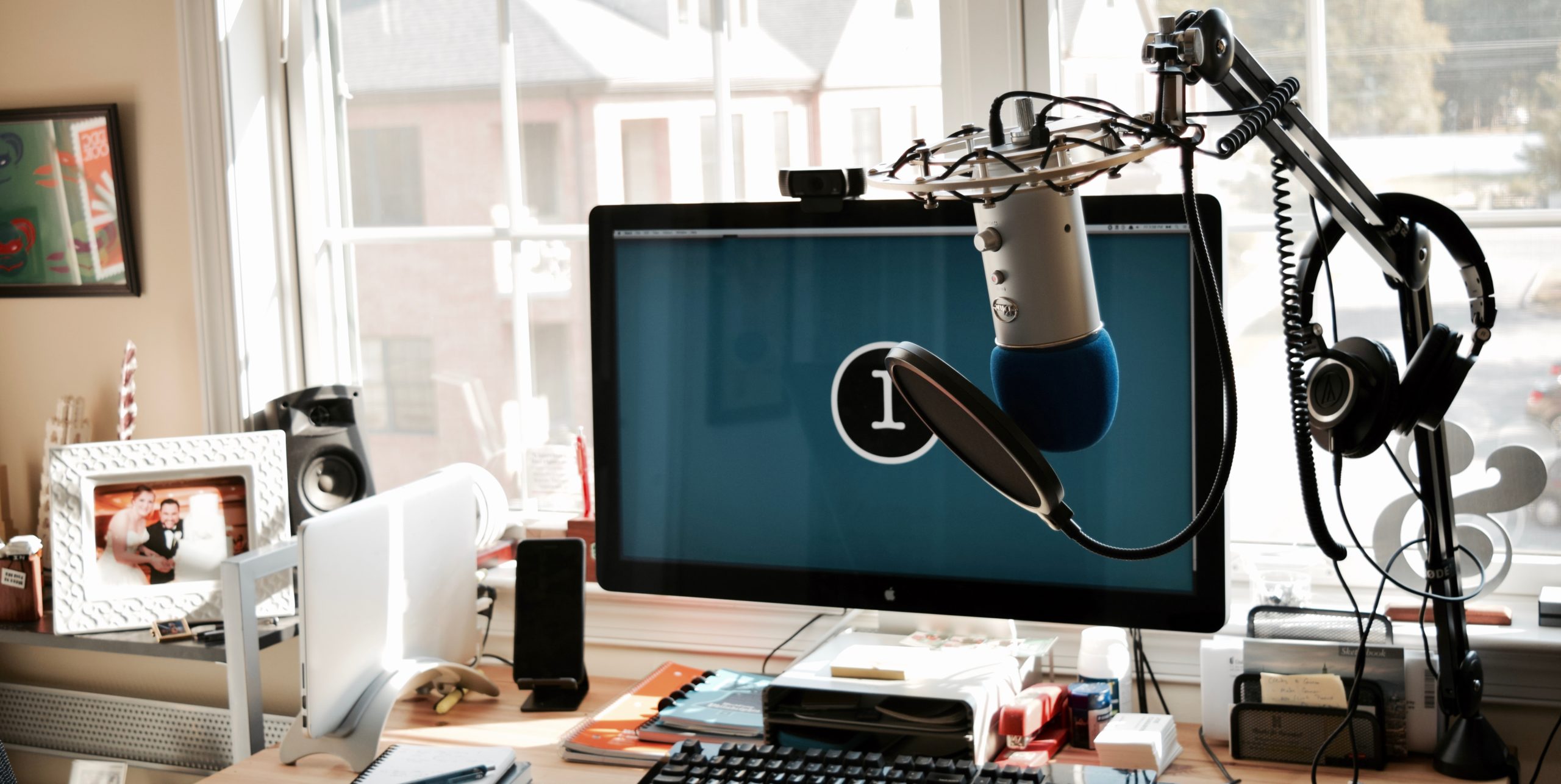
Check out my Podcast Gear
This summer I started two projects that require me to be in front of a microphone: WP in One Month and How I Built It. It’s a lot of work, but fun and rewarding. One important aspect of recording is making sure you have the right hardware and software. It can take a lot of research and get a bit pricy, but the quality of what you put out makes it worth it. I’ve spent some time finding the right tools; here’s my current setup.
Hardware
Mic: The Blue Yeti. A good mic is essential and I got this one at a great deal on Amazon Prime Day 2015. I’ve been incredibly happy with what I’ve been able to produce. If I were buying one today, another option I might go with the Rode Podcaster, since that’s the most frequently recommended.
Headphones: Audio-Technica ATH-M50x Professional Studio Monitor Headphones. A good set of headphones prevents echo during recordings and lets me hear a lot more in the recordings, which helps me clean up the audio. These over-the-ear headphones are great in every aspect. I wouldn’t change a thing.
Boom Arm: RODE PSA1 Swivel Mount Studio Microphone Boom Arm. A Boom arm keeps the mic out of my way and off my desk. I don’t have to type around it or even necessarily keep it in camera (if I’m recording video). This is a strong, flexible, and stable arm.
Extras: I have a few extras here to help filter sound as it’s going into the mic, as opposed to fixing it in post.
- The Blue Microphones RADIUS II Microphone Shock Mount helps protect the mic from picking up vibrations from small movements and knocks.
- A Pop Filter serves as a wind gate, preventing sounds like hard Ps from coming through on the recording, without having to fix it in post-production.
- A Foam Wind Screen adds a little extra protection for the whole mic, not just the front of it, like the pop filter.
Software
There are also a few pieces of software I use in order to record and edit podcasts and videos.
- Libsyn: This is what I use to host the audio files. It comes recommended by most, handles the hard stuff, and gives you some some great stats.
- Fiverr: Fiverr has proven a great resource for sending raw audio files and getting back an edited, cleaned up podcast for relatively cheap. I usually spend $30/episode, and seeing as it would take me an hour or more to edit myself, it’s a great deal.
- Skype: I’ll record interviews using Skype.
- Garageband: This is the app I use when I’m adding intros, outros, and sponsor spots.
- Wiretap Studio: Admittedly, this is pretty old software that I got for free, but it does what I need it to: 2-channel recordings for me and my guests.
- Sound Siphon: One drawback of Wiretap Studio is it can’t record app-specific audio, and you need a driver to get mac’s audio. Sound Siphon fixes that (though I am open to other suggestions).
- Camtasia: When I’m doing video recordings, there is nothing better than Camtasia.
Podcasting Process and Improvements
The last important aspect of podcasting is your process. I call my guests with Skype, and while I don’t record the video, I like seeing the guest to make it feel more conversational and keep me more focused.
I will also have my guests record their own audio and send it to me later. It adds a little bit more work to combine the audio, but there’s 2 reasons for this:
- If the internet gets slow and the audio drops, we won’t lose quality or have to re-record the interview.
- We’ll have the uncompressed audio from both sides, which makes the entire podcast sound better.
I also send all of my guests these notes on how to record their audio, as well as what I will ask and tips on how to improve bandwidth.
The one improvement I would like to make (but won’t be able to until I move into a house) is to add some sound proof foam to the walls. With the windows and thin walls of my apartment, it can get noisy, so I need to choose my recording times and hope for the best. A room in the basement with no windows and some soundproofing will go a long way it making sure my recordings don’t need to be cleaned up in post.
Do you do a lot of recording or want to start? What are your tools? Let me know in the comments!
