iPhone

  • The Peak Design Everyday Case

    I have never been a big fan of cases. I don’t like my phone1 to be bulkier than it needs to be.

    And for a long time, I didn’t need them. I was flummoxed by people who broke their phones. The first time I had to use phone insurance for a shattered device, my wife, then girlfriend dropped it2.

    But recently, I find myself dropping my device a lot. I’m trying to do too many things, multitasking while also trying to be a dad to 3 small kids, and my phone gets dropped (or picked up by my children, and then dropped).

    Suffice to say, I’m willing to invest in a $12-50 case if it means I don’t have to pay $100 to get it repaired before trading it in.

    I wanted a good mix of sleekness and protection, and thought I’d go with the Caudable Sheath, which has been drop tested up to 6.6 feet. I’ve used it before and really liked it.

    But I also decided to try the Peak Design Everyday Case. I like their bags and other gear, it looked nice, and they have a whole accessories system3.

    And my friends…I’ve seen the Promised Land of phone cases. It’s so good.

    photo from peakdesign.com

    It’s slimmer than the Sheath and nearly as protective – 6 feet vs. the Sheath’s 6.6 feet.

    It’s sturdy with all of my current MagSafe accessories, and I also got the mini tripod. It’s great for photos, as well as watching or hands-free reading.

    If you’re in the market for a new phone case, I highly recommend the Peak Design Everyday Case. It’s won me over. It will be the case I buy for new phones as long as they make it.

    1. Or any of my devices for that matter ?
    2. She is a phone assassin. I call her that to her face. ?
    3. I love phone accessories. ?
  • The Belkin MagSafe Mount for Studio Display

    I ordered the Belkin iPhone Mount with MagSafe for Mac desktops and displays in December, and it came in last week. My initial impression: it’s nice — way nicer than the laptop one.

    Here’s the shot from my iPhone on the mount, first with, then without, Center Stage:

    Here’s what I like about it:

    • It’s compact and folds up nicely
    • It’s fully adjustable for tilt, and the head slides so you can adjust the phone to sit closer or further from you.
    • It can be mounted on a tripod. This will likely replace All of the other phone tripod mounts I have.
    • The MagSafe is quite strong. I have the Peak Design case1 and the phone stayed mounted no problem.

    All-in-all I’m really happy with this purchase. I highly recommend it if you have a monitor and want to use your iPhone as a webcam — whether or not you use Continuity Camera to do it.

    Want a video demo? Join How I Built It Pro

    Here are a few more photos of the mount:

    1. Also MagSafe. More on that later. ?
  • Simplifying my iPhone Home Screen

    Since widgets came out with iOS 15, I’ve been obsessed with finding the right amount of information to fit on that screen…the perfect combo of accessibility and glanceability.

    I had multiple pages, customizable by focus modes, with widgets galore…until a few days ago.

    I came to a realization that I wasn’t using most of the widgets and the multiple pages made it harder for me to find what I wanted quickly.

    So I decided to do 2 things:

    1. Simplify my home screens to be 1 page + the App Library1
    2. Make use of the hidden “Today” screen for widgets I want to reference or use but don’t always want to see.

    The result is this:

    My Today screen and sole Home Screen page

    The left shows the Today screen, which includes the big calendar widget with all of my appointments and such. It also includes:

    1. Drafts’ quick actions widget for fast input
    2. A shortcuts widget for commonly used shortcuts I don’t keep on my Home Screen.
    3. And then below the fold, a number of Home+ widgets for controlling my home and scenes.

    The right show’s my sole Home Screen page, which includes:

    1. A medium widget stack with CARROT Weather, another calendar widget with just the date and upcoming appointments, and recent Drafts
    2. A small widget stack with links to my Dashboard and the Today note in Craft
    3. A small widget stack with Apple Music and Overcast.

    The icons, from top to bottom and left to right are:

    1. The Phone
    2. PCalc (the best calculator app)
    3. The “I have an idea” shortcut, which takes text or voice input and adds a Draft and a note to Craft
    4. The “Read” shortcut, which gives me a list of reading apps, including Reader by Readies, Substack, Kindle, News, and a link to my unsorted notes in Craft
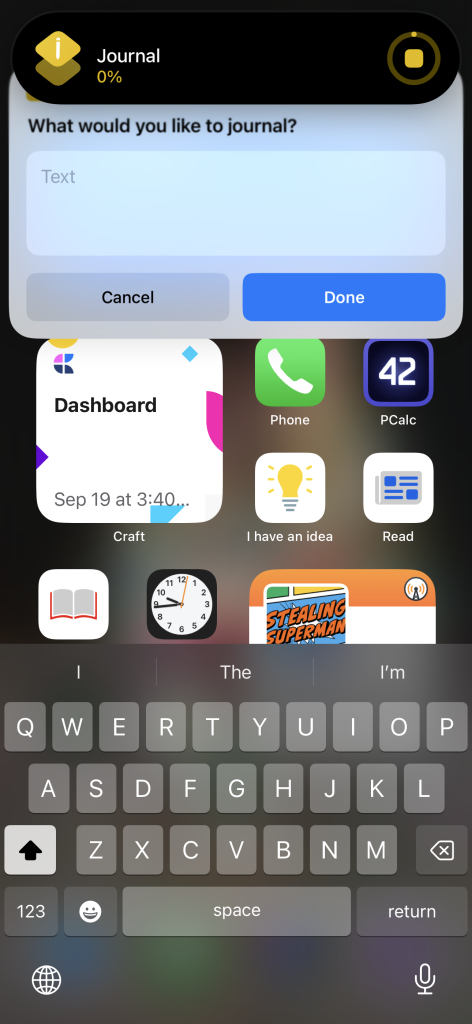
    5. The “Journal” shortcut, which takes text or voice input and adds a bullet item to my today note in Craft2
    6. The Clock app, so I can see the time down to the second.
    7. The “Add Task” shortcut, which creates a new task in Omnifocus
    8. The “Money” shortcut, which gives me a list of all the financial apps I check each morning

    And then the dock: Safari, Messages, Craft, Omnifocus.

    A couple of bonus screenshots:

    I’d love to know: what does your iPhone home screen look like? Do you use widgets? And what about the Lock Screen?

    1. I still have some specific pages for Focus Modes like Travel and “Green Zone,” but the same rules apply. ?
    2. I’m trying to journal more but not in any kind of formal process. Just random thoughts throughout the day. ?
  • Who is iPhone 13 Pro Really For?

    One of the core beliefs at Apple is telling a good story; it’s weaved into everything they do — every product, service, and publication. I mean, have you seen their 2021 Holiday commercial, Saving Simon? It’s really good1.

    Something you’ll notice with that commercial is that it opens by telling you it was shot on iPhone 13 Pro. And in-fact that story they told at the iPhone event in September, about iPhone 13 Pro, was that it’s for movie makers and cinematographers. That’s a fun story. It might even work. But that’s not who iPhone 13 Pro is actually for. That’s just the story. That’s why they call it “Pro.”

    But if it’s not for movie makers, who is it really for?

  • My Hopes and Dreams for WWDC 2021

    It’s WWDC week – in fact today at 1pm ET is the Keynote, which is generally a popular event. It’s one of the few tech company. keynotes I know people organize watch parties for! As we go into WWDC I thought I’d talk about a few of my hopes and dreams for what we’ll see, starting with the iPad Pro. 

    (more…)
  • Using Back Tap on iPhone

    I had the pleasure of participating in the GoWP Niche Agency Owners Happiness Hour recently and we talked all about tools (I didn’t know that going in, but as you can imagine I was pleased). Something I got to demo was how to turn on iPhone Back Tap (a feature in iOS 14 and up). Since many didn’t know about it, I thought it would be a good thing to demo here.

    (more…)
  • 5 Years with an iPhone

    Recently on my podcast, How I Built It, I got to speak to Stephen Hackett. During our chat I was reminded of, and subsequently mentioned, the time Phil Schiller (now an Apple Fellow – congrats Phil!) tweeted a link to my blog with the text, “Joe switched!” It was my most popular blog post up until that point, and remains one of the most popular. In honor of that, I wanted to do a new write up: 5 years with an iPhone.

    (more…)
  • Find the Right Podcast Membership Benefits with Stephen Hackett

    Stephen Hackett is one of my favorite podcasters, and cofounded my favorite podcast network, Relay.fm. Back in 2018, I spoke to his co-founder Myke Hurley about starting podcasts. Since then, Relay has really ramped up their membership program and I though Stephen would be the perfect guy to talk to about putting out tons of content and deciding what to make free, and what to make paid. Sponsored by Yes Plz, iThemes Security Pro, and TextExpander.

    (more…)

  • Alternatives to Apple’s AirPower

    I’m not gonna lie – I was really looking forward to AirPower. I was willing to pay entirely too much for it, because I’m all about wireless charging. As of today, Apple announced they’re cancelling AirPower. Since Apple announced it (all the way back in 2017), I’ve looked into AirPower alternatives, but never made a purchase. Here are the ones that look good to me.

    (more…)