
How to get Keyword Search for Safari Anywhere with TextExpander
I do a lot of searching directly from the address bar in whatever browser I happen to be in (usually Safari), so anything to make that process faster would be super swell. A while back, I learned about the Safari Keyword Search Extension from Six Colors, and decided to give it a try. It is incredible! Oh, and as of iOS 15, it works on iPhone and iPad too!
How It Works
Once you install the extension, it gives you a list of shorthand snippets for common searches. So far example, g Casabona would open a Google Search for “Casabona.” yt Baby Shark would open a YouTube search for…well you know.
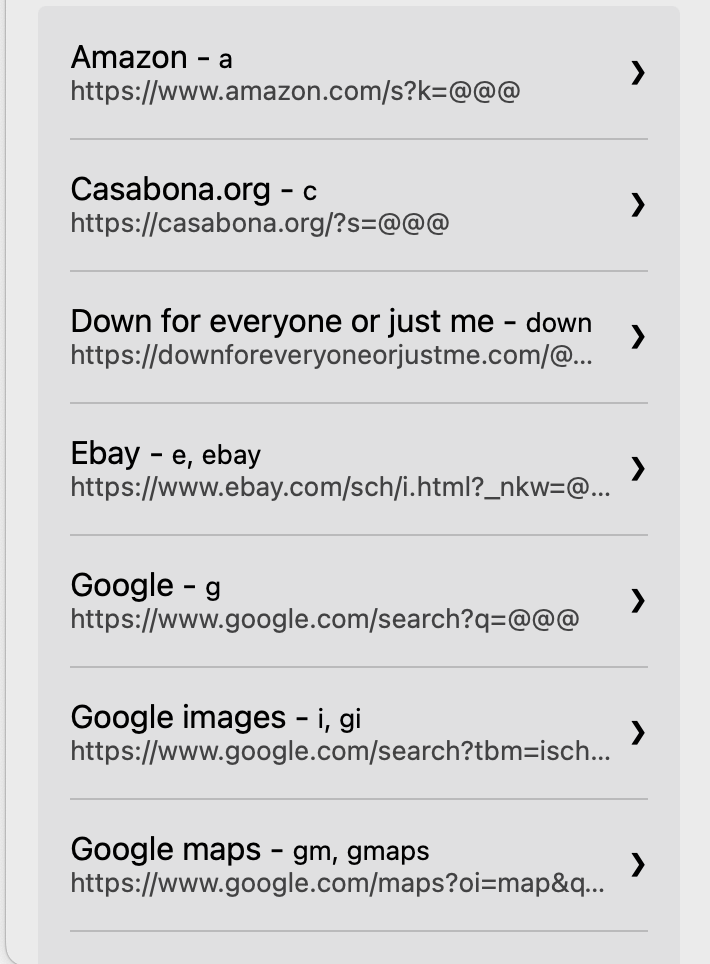
But as you can see from the above screenshot, you can also add custom search. So I’ve added one for this site, as I’m often looking for links. I’ve also added one for searching Unsplash, and the LinkedIn Learning Library.
The only problem is, it appears, if you don’t use Safari you’re out of luck.
Using TextExpander Instead
There is another way though. If you use TextExpander*, you can get a decent replacement that is cross browser. Create a new snippet with the URL:
https://casabona.org/?s= and then a Single Text line fill in.
Expanding this will allow you to create the search URL. Then you can press Enter/Return. OR, you can simulate that click right in Text Expander. The final snippet will look something like this:

The only drawback is you’ll need to create separate snippet for each URL you want to search. You can join the Creator Crew to get my list in the Automation Library.
*Full disclosure: TextExpander is a current sponsor of my podcast, How I Built It.
Fast Searching!
Before this extension, I don’t think I realized how much I actually searched for stuff on places besides Google. It saves me a ton of time, and I know it will for you too.
