
|

Install Let’s Encrypt on WP Engine

I created a quick (less than 5 minute) video on how to get free SSL using Let’s Encrypt on WP Engine. Check it out! And to learn more about WP Engine, click here. Written Instructions after the jump!

  1. After logging into your website and choosing the site you want to install Let’s Encrypt on, click on SSL in the left nav menu.

  2.  From there, you’ll be taken to your SSL Certificate Management page. on the right, click “Add Certificates”

  3. Choose the first option: “Get Let’s Encrypt”

  4. Make sure all domains on the page are checked, agree to the Terms, and click “Request SSL Certificate”
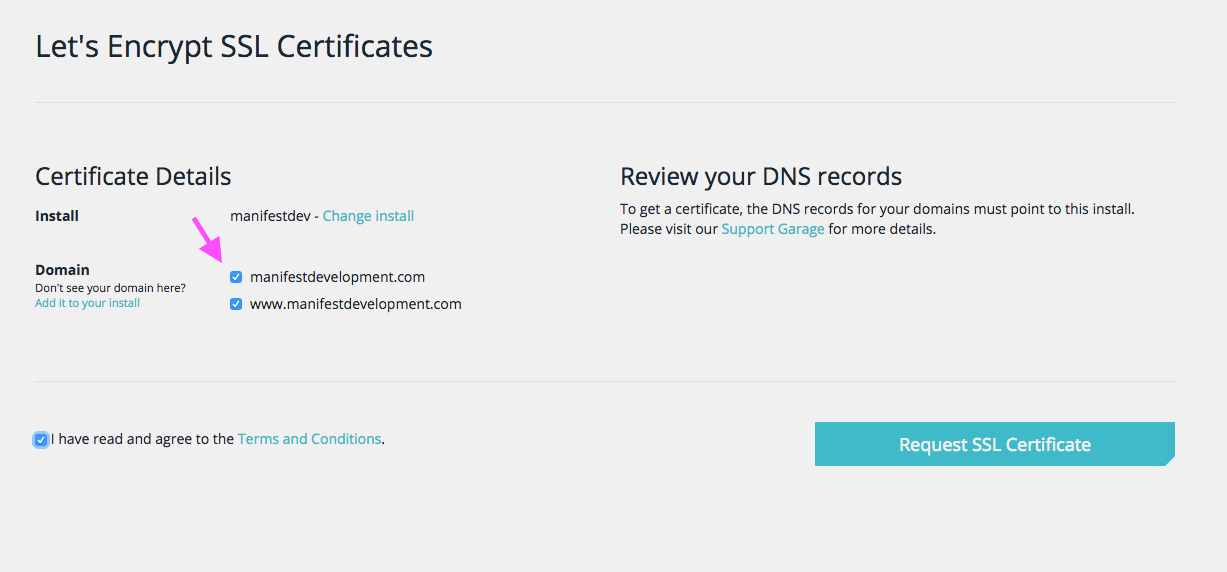
That’s it! It will take a few minutes to generate the certificates, and you will get an email when they are ready. From there you’re ready to use SSL on your WordPress site (check the video for a quick bonus).

Learn More about WP Engine

Similar Posts

  • Links Round Up for 7/25/10

    Note: This article was published while I was in my early 20s. I was much younger and dumber. Please don’t hold it against me. One of the perils of having a 20+ year old website! How To Design And Style Your WordPress Plugin Admin Panel: This helped me immensely this week. Great for any WordPress…

  • | |

    Rock-Solid WordPress 3.0 Themes using Custom Post Types

    Note: This article was published while I was in my early 20s. I was much younger and dumber. Please don’t hold it against me. One of the perils of having a 20+ year old website!The good people over at Nettuts+ have published a tutorial I wrote for them called Rock-Solid WordPress 3.0 Themes using Custom…

  • Clients Always Mess Things Up

    Imagine you’re buying a new phone. You walk into the store and you overhear a conversation with 2 of the sales clerks. One says to the other, “Ugh. One of my customers put an ugly case on the beautiful iPhone I gave them. Customers are so stupid. They always mess things up.” You probably wouldn’t…

  • |

    Announcing Responsive Design with WordPress

    If you’ve been milling around the site lately, or follow me on Facebook, Twitter, Google+, LinkedIn, or Dribbble, you’ll know I’ve been working on a book. Last week I officially launched the site for @NEPABlogCon and I’m happy today to officially announce my second book, Responsive Design with WordPress. Responsive Design with WordPress shows readers Responsive…

  • Tools I’m Using to Avoid Spoilers

    Between a certain Game of Thrones and Avengers: Endgame, I’ve been seeing many complaints about things being spoiler on social media. Even with the lengths I went through when Infinity War came out, it was still spoiled because a careless YouTuber (me) let autoplay happen unregulated, and another YouTuber (the guy in the video) opened…