
WordPress Multisite Domain Mapping on Media Temple (dv)
I recently stood up a WordPress Network/Multisite that I wanted to use for several different client “Quick Sites” – simple WordPress sites I offer that don’t require a lot of customization. I thought my steps were simple; install WordPress Multisite and then get top-level domain mapping working. The latter was not as easy as I thought it would be because different hosts handle this in different ways. Here I’ll give you the steps for doing it on a Media Temple Dedicated Virtual Server (dv).
There were a bunch of things I tried before ultimately contacting Media Temple’s excellent support and finding out it was much easier than what I was doing. I tried following this tutorial, which got me most of the way there; however, when we get to the Media Temple specific section, it links to a KB article that only applies to Grid Server (gs). If you’re using (dv), you need to follow a separate set of instructions that don’t require using the terminal/SSH at all. For simplicity’s sake, I’ll refer to the main domain as maindomain.com, and then any other sub-sites with top level domains as site1.com, site2.com, etc. I also assume you’re familiar with Plesk on Media Temple.
What I would recommend is setting up maindomain.com as a separate subscription in Plesk. Then later, I’ll tell you how to add site1.com, site2.com etc. to point to maindomain.com in order to get the domain mapping plug-in working correctly.
First things first: Install a WordPress Network and follow Otto’s Domain Mapping Tutorial up through Step 3. The next steps you need to take happen in Plesk. Head on over to your Subscriptions panel in Plesk and click on the Control Panel link for maindomain.com

Once you get to the domain’s Control Panel, you’ll see an area for maindomain.com in the left column, and under that, a link called, “Add Domain.” Click that.

On the next screen, fill in your subsite’s top-level domain (site1.com for example), and make sure the Document Root is pointing to /httpdocs. This is incredibly important! What’s going on is we’re going to point all of the domains to maindomain.com’s root folder. From there The Domain Mapping Plugin will route each domain to the proper site in WordPress.

Click OK and you’re done! Repeat for each domain. Once you do that, you should see all of your domains listed, all pointing to /httpdocs/.
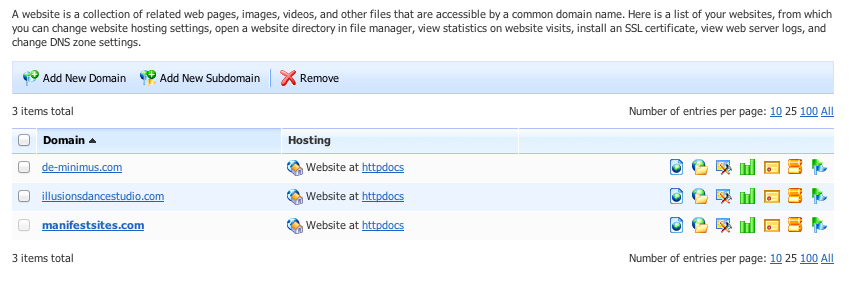
Once this is complete, you can finish up Otto’s tutorial, adding those new domains and associating them with sites on your WordPress Network, and boom; you now have a WordPress Multisite with several top level domains!
Okay Joe, you made that WAYY too simple. I’ve been looking and looking into doing this but just haven’t put the time down. Thanks for the great post.
Thanks for the blog post, you have some really useful information here. Have you checked out (mt) Media Temple’s Wiki page? I think this would make a great addition:
http://wiki.mediatemple.net
Let us know if you ever need anything, we’re available 24/7 on Twitter: @MediaTemple
Drew J
(mt) Media Temple
@MediaTemple