How Good is Your Idea Capture System?
Have you ever woken up in the middle of the night with an amazing thought and then said, “I’ll remember it in the morning?”
I have. And just like death and taxes, it’s a guarantee that I’ll completely forget it in the morning. As my friend Cat Mulvihill pointed out on social media recently, “if it’s important enough, I’ll remember it,” is a lie.
If it were true, then we’d always remember birthdays, milk, and our kids’ lunchboxes in the fridge as we’re running out the door.
Without the right systems in place, we’d forget more than we remember.
That means following up with clients, fixing our product, and great ideas for podcast episodes.
That’s why idea capture is so critical to me — and why my system might seem like overkill.
But today I’d like to walk you through all the ways I easily capture ideas and thoughts — and the system I put in place, so I don’t miss anything.
Then we’ll cover what you should think about!
You Can’t Rush Results
My wife is a nurse and had to work this past weekend, which put me on dad duty.
For lunch, we usually have Uncrustables or chicken nuggets. But for dinner, I decided to cook chicken cutlets, the way my mom used to make.
I started heating two pans on high — the Always Pan (which is amazing), and an old iron sauté pan. I added a generous amount of oil to both (hot oil is the key here).
Then I started prepping the chicken, beat the eggs and poured the breadcrumbs.
Except what I didn’t realize was the iron pan heated way faster than the Always Pan, which is what I usually use.
I turn around to see smoke billowing out of the iron pan as the oil burned off.
I opened the windows, turn on the stove fan, and the ceiling fan, and sent the kids outside.
It was too late though. All of smoke alarms on the main floor went off.
My fatal mistake? I assumed “hotter” meant cooking faster.
But that is seldom the case. Instead, I made a bigger mess, and almost burnt the cutlets to boot.
They were still mad good though.
See, I tried to rush the results by rushing the process. But most things take time.
It’s as true in cooking as it is in automation.
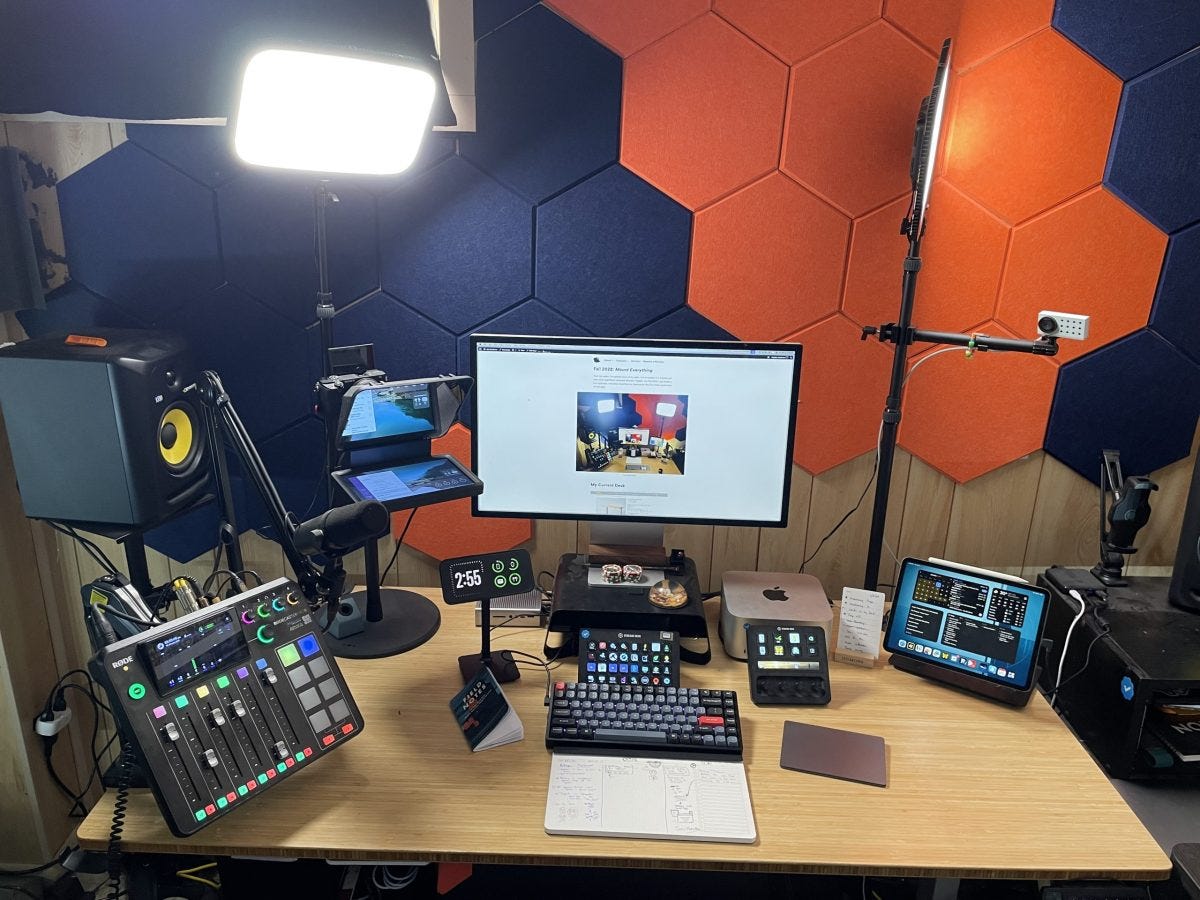
On Saturday, I told you about my latest desk setup — while simultaneously stressing that this was an incremental build over years.
When you start automating, it’s the same. On the latest episode of Streamlined Solopreneur, I talk to mom and business owner Kim Caloca-Madden about this very thing: begin by automating simple, repetitive tasks that consume time.
Examples include task management, calendar synchronization, and email responses.
By starting small and taking little things off your plate, you can start to see gains, create more space in your schedule, and learn what’s possible.
My challenge for you: Think about an easily repeatable task that you might be able to take off your plate.
And if you want to learn more, listen to my interview with Kim Caloca-Madden.
Deleting My Mail App From my Phone
I was listening to the latest episode of Cortex, where Grey is helping Myke through the question of how to handle email on his phone. There was a 60 second segment that sent me on a roller coaster ride of emotions. It went something like this:
Myke: “I’m thinking of turning off email notifications on my phone.”
Me: Oh my god — why would you even have them on at all?!
Myke: “…but I’m worried that’s just going to make me check the email app more.”
Me: Oh. That’s exactly what I do.
In-fact, since deleting social media apps off my phone, Spark — my email app of choice — felt like what I opened the most (though the data below tells a different story).
While quick checks can seem innocuous, email is probably the communication that can derail my time the most. Slack isn’t on my phone, and I generally keep all of my work-related communications to email.
So if I absent-mindedly check my email with my kids and I get an email that bothers me (or something I’m excited to tend to), it will continue to eat up my mental energy until I deal with it.
I hate that. So, I’ve decided to delete Spark from my phone. It’s been a few days, and so far so good.
There are a few caveats.
First, I’m keeping the Mail app on my phone for any 2-factor authentication (2FA) or login codes I might need. However, I truly hate using the Mail app, so I expect I won’t be tempted to check mail there.
Plus, you can turn off app suggestions!


How to turn off Siri Suggestions for an app I also considered keeping the Gmail app, since Google insists on 2FA by clicking a button in the app, but I’m almost certain this is any of Google’s apps, so I’ve deleted that too.
I’m very keen to see what this does to my Pickups and Screen Time.
Now, when you delete an app, it removed the Screen Time data on the device where you deleted it. But luckily that info is synced with iCloud. So I offer some initial stats from last week — with the note that I deleted the app on Saturday at some point:
I’ll keep you posted to see if Screen Time and Pickups go down!
What’s an app you think YOU should delete from your phone? Let me know in the comments!
- Gear | Productivity | Thoughts
What’s on my Desk? — A Complete Tour! (Winter 2024)

Over the years, I’ve posted tours of my desk. I try to update it 2-3 times per year when significant hardware changes happen. Since the last post (Fall 2022), I’ve made several changes to light positioning, I/O devices, and added one big piece to the puzzle.
When Do You Burn All of Your Processes Down and Start Over?
It’s been quite a week, my friend.
Last week I started to feel sick, undoubtedly catching the plague my children have had for the past 2 weeks. I was the last one to fall.
Happily, I’m feeling better, but my entire week was thrown into disarray.
And it’s during the disarray that you see the cracks in your processes. While mine are pretty good, I’m growing tired of some of the tools I’m using.
In-fact, earlier this week on social media, I posted that I’m moving most of my operations to Notion from Airtable.
This is probably surprising, considering not 5 months ago, I wrote a piece proclaiming the exact opposite.
So what changed, and why am I deciding to make the transition despite the considerable technical debt?
When asked on Threads what inspired the change, I responded with this:
Over the last year or so they’ve made changes that took features away from paying customers, and added features to the free plan that paying customers STILL have to pay for.
Just feels like they’re not interested in helping small business owners anymore.
I like Notion because it’s flexible, used by a lot of people, and has been adding great features (like automations).
I also feel like I know what I’m paying for, and when I’m paying, when I pay for Notion.
And while that’s mostly the case, there are a couple of other reasons.
For one, I find myself spending most of my time in Notion these days. I’ve already moved a bunch of my operations there, and people I work regularly with, like RSS.com, and my assistant, Jordan, already work in Notion.
I’ve also moved family stuff into Notion, and it was very easy to share that stuff with my wife.
When I do open Airtable, it now feels cumbersome. I can’t view everything I need to view in one spot (even with interfaces), and it’s slow.
But, while this certainly feels like a major move (that I still need to make the checklists for), it’s actually a smaller part of bigger changes I’m making moving into 2024.
See, my entire tech stack is changing. Here are the switches I’m making:
- Organization and Ops: Airtable to Notion
- Podcast Recording: Riverside to Squadcast
- Projects/Task Management: Todoist to Things 3
- Scheduling: Calendly to SavvyCal (probably, in this case)
I’ll likely write about this in greater detail in future articles, but taking out task manager (which I feel like I change a little too often), I’m moving to Squadcast because it’s now including with my Descript subscription, and I’m displeased with the direction Riverside is going in.
And the switch to SavvyCal is related — they have very tight integration with Squadcast, which is one of the most important parts of my guest-booking workflow.
Of-course, all of this requires considerable changes — so why now?
It’s a combination of cost-savings and frustration. I’ve been increasingly frustrated with Airtable, which is what pushed me to test Notion in the first place.
I don’t like how much I’m paying for Airtable, and like even less that they seem to be taking more features away from the plan I’m paying for.
Couple that with the fact that Notion is more affordable, even with full-access guests, and that they just rolled out their own Automations, and it felt like a good time to jump.
All of the moves will save me $450 annually, and will end up saving me time too. Not bad.
So when do you burn it all down and start over?
I think it’s when the frustrations start getting in the way of you working efficiently.
If what you have is working, and you can continue to afford the tools you use, leave them be.
But if your processes suddenly start fighting you, or there’s a consolidation of tools (like with Descript/Squadcast), you should consider changing.
It’s also worth noting that you’re likely not rebuilding your entire process stack like I am. But if you are switching a couple of things all at the same time, you likely don’t have to repeat some of that switch work.
For example, Moving from Airtable to Notion will requirement me to update my Guest onboarding automation anyway — so I’ll be able to update it both for Notion and SavvyCal.
If you’re worried about the level of effort — well don’t worry. I’ll be documenting that for you 🙂
Make vs. Zapier: Why I Moved
January has come and gone, and I’ve made the decision to fully move from Zapier to Make. I’m pleased with the functionality, the workflows, and the considerable cost difference1.
Here are my thoughts after one month with Make:


I really love the route building and general design of the scenarios better. The interface is much more intuitive. It’s easier to move things around, insert actions between other actions, create filters, and add routes.
MUCH. Easier.
You do need a little more know-how than with Zapier. Zapier has some tighter integrations with Dropbox and Google. For example, if you want to use your personal Gmail account, you need to spin up an API key for certain actions, instead of just authenticating.
It is a lot more secure though, as you’re not giving complete access to an app. You’re explicitly choosing the services you want the app to have access to.
Along what that know-how, you need to be mindful of how often your scenarios run. Since Make charges per operation, you can’t just let your automations run wild. I ended up hitting the 10,000 operation limit within 2 weeks.


Luckily, I was able to dial them back a reasonable amount and now I’m well within the limits of 10,000 operations per month, giving me wiggle room to add even more scenarios. And for what it’s worth, Zapier has this baked into their much higher cost.
The way to manage operations is to not have them run as often. The default is 15 minutes. I have some run every 2 hours, and some that run every 2 days. This is perfectly fine for me. They still run often enough that it doesn’t bottleneck my workflows. The hardest part was coming to terms with knowing they aren’t constantly running.
Make is much more affordable. I’d need to pay for around 90,000 operations to hit the same monthly costs as with Zapier. If I doubled my monthly operations, I’m still saving $55/mo on the billed monthly plan.
Finally, thanks to re-evaluating my automations, I was able to create more efficient actions, as well as move some automations to the native apps. For example, Vimeo has direct integration with Dropbox. I don’t need Make or Zapier as a third party anymore.
If you have any questions about Make, feel free to leave them in the comments!
- I got a few people tell me that the time savings is worth the month. My friends, the wealthy didn’t get wealthy by wasting money. And IMO, using Zapier over Make if you have more than 5 automations is a waste of money. ?
How to Add a Google Doc in a Specific Folder with Your Stream Deck
I’ve greatly improved my process for creating social media content in a centralized place.
The basic workflow is this:
- Create a Google Doc in a folder called “Social Posts”
- Kick off a Make automation that watches that folder, and adds a new entry to my “Social Media content” base in Airtable. A schedule date is also determined.
Then my VA goes in and reviews the documents, creating images as needed, and posting them on the scheduled dates.
Switching to Make
Formerly Integromat
One thing I like to do in December is review my expenses, switch things from yearly to monthly, and see what I can change.
This year I decided to switch Zapier from yearly to monthly and learned they charge an obnoxious 33% more because of it.
Combine that with a recent episode of the Automators podcast that covers Make, and I’ve decided to try switching completely to Make from Zapier.