On Monday, I’m publishing a video about my entire iPhone setup (subscribe on YouTube to get it). As I was gathering links, I realized most of what I use is on sale for Black Friday.
I’ve been pondering getting an actual business line since many services don’t accept Google Voice, and then T-Mobile emailed me that I was gifted a free line.
Back in January, I wrote about how I Bought, and Returned, the Ozlo Sleepbuds. I was excited to try a pair of headphones specifically made for sleep, as my AirPods Pro usually hurt my ears (I’m a side sleeper) and fell out.
The TL;DR of that post is that they are an incredibly disappointing product that also happens to cost $300.
I’ve always been bad at using teleprompters — they are big, clunky, and the consumer versions usually require a separate device and app.
Until Elgato released the Prompter in late 2023. It seems like an answer to my prayers — and it was for a while. It worked seamlessly with my Stream Deck, and while the “voice advance” feature was a miss, it still makes eye contact on calls and recording much easier.
But over the last 6 months, it’s gotten nearly unusable, and unrecommendable. That’s all thanks to the DisplayLink software the prompter requires.
I really wasn’t going to write another, “I’m leaving Twitter/X,” post. I was going to quiet quit. I think announcements that you’re leaving a thing are mostly self aggrandizing, as if life won’t possibly go on once you’re gone.
It feels weird to say that about a platform that I’ve been on for 17 years, 8 months and 5 days. That’s over 45% of my life, after all.
But I’ve greatly disliked Twitter for a long time — even before Elon bought it and renamed it X. I think most social networks straddle this weird middle ground between parasocial and reciprocal relationships, and that’s more unhealthy than healthy.
But that’s neither here nor there. The main reason I’m leaving Twitter is that the posts I made get very little visibility, and I’m aggravated by it most of the time.
It’s an incredible time suck, and I see things I don’t care to see, despite spending 17 years, 8 months and 5 days carefully curating my muted words, follow lists, and block words.
So I’m jumping ship for Bluesky, which currently has the winning combination of enough people I care to interact with + no algorithm. I only see the people and topics I follow, and that’s swell.
Still, I would rather not deactivate my account for 2 reasons:
I don’t want my username to go back into the ether for some other random person to take.
My read later app, Reader by Readwise, does Twitter List Digests, and my Baseball list is an excellent resource that I won’t be ready to give up until some important folks are on Bluesky1.
So how do I make sure those two things stay intact while also ensuring I can never log in again? Here’s what I’m doing.
If you’re new around these parts, over the summer we decided not to do summer camp to spend more time with our kids (and literally save thousands of dollars).
And in my retro about the summer, I talk the good, the bad, and the ugly (spoiler: it was largely good).
But there was one long-lasting effect I didn’t notice until recently: I made my schedule pretty open for anyone who wanted to meet.
I didn’t want them to be limited to my limited availability, so I tried to be as open as possible.
But over the last few weeks —really since my episode with Conny, I realized that I’ve let everyone else control my calendar.
The day I recorded with Conny, I was all over the place, stressed, and exhausted because I had meetings basically all day — and it ended with a podcast recording where I had to be “on.”
I decided to take a meeting with almost anyone bc I feel they are the best way to form relationships, but I’m not vetting those people.
I wasn’t creating boundaries for my meetings either. I even have a calendar that’s totally open for friends — but I’ve sent it to more than friends.
If you’re a busy solopreneur — especially a parent or someone with other obligations, like a podcast, how do you make sure you don’t cede your entire schedule to everyone else?
In Streamlined Solopreneur this week, I present a couple of solutions, and a tool to help.
Here’s the gist.
The first thing you should do is ask yourself these 4 questions:
What times are non-negotiable for meetings? When are times where you absolutely won’t meet? Can you create blocks of time here?
How many meetings can I realistically handle in a day?
Which meetings are essential, and which can be handled asynchronously?
How will I handle exceptions or conflicts?
I do my best work in the morning, so most morning are off limits for me — I do have a recurring meeting on Tuesdays, so I built-in some time after that.
I also have at least one 3-hour block each day that’s totally off limits, plus no meetings Mondays or Fridays.
I think I can realistically do 3-4 meetings per day, and I’ve determined that podcast recordings and sales calls for high ticket items are the most essential “must have” meetings. Others will happen, but might be able to happen asynchronously.
Write down these rules, and maybe block off a calendar. Here’s what mine looks like:
Then it’s time to put this into practice. I use Cal.com for my scheduling, and you can create working hours, as well as limit meetings per-calendar.
The only feature Cal.com (and I think most schedulers) is missing is the ability to globally limit the number of meetings per day, so I’ll have to keep an eye on that — but that’s not a huge issue right now, and probably won’t be, given the limit and buffers across the rest of the app.
Doing this will create the space you need in your schedule to get deep, meaningful work done — and it means that you’re not at the mercy of everyone else’s schedule.
Combine this with a few good processes, and you’ll be focusing on your most important work — or be able to show up for loved one better — in no time.
If you want to learn even more about how I’m guarding my time, check out the latest episode of Streamlined Solopreneur.
My grandfather came to the United States from Italy in 1949 and worked in New York City for much of his life — primarily in construction.
Both he and my parents moved out of the city (though I wouldn’t say Upstate), after he retired. But he continued to do home projects as I grew up. My dad would say he could paint an entire room in a 3-piece suit and not get a drop on him.
For as long as I can remember, he had this big, metal toolbox — you know, one of those big grey ones with the curved top and the center latch. When he passed away, he gave it to me, and I still have and use it to this day.
In fact, most of the tools in his toolbox, Pop had for decades. When he found something that worked for him, he held on to it, and took care of it. There’s a hammer in there that has to be as old as I am.
And when you think about it, the hammer is a pretty good analogy for our digital tools. It’s a basic device, but there are countless variations, purpose built for specific tasks. Much like a task manager or notes app, you mostly know what you’re getting — but you may want something a little more specialized for your needs.
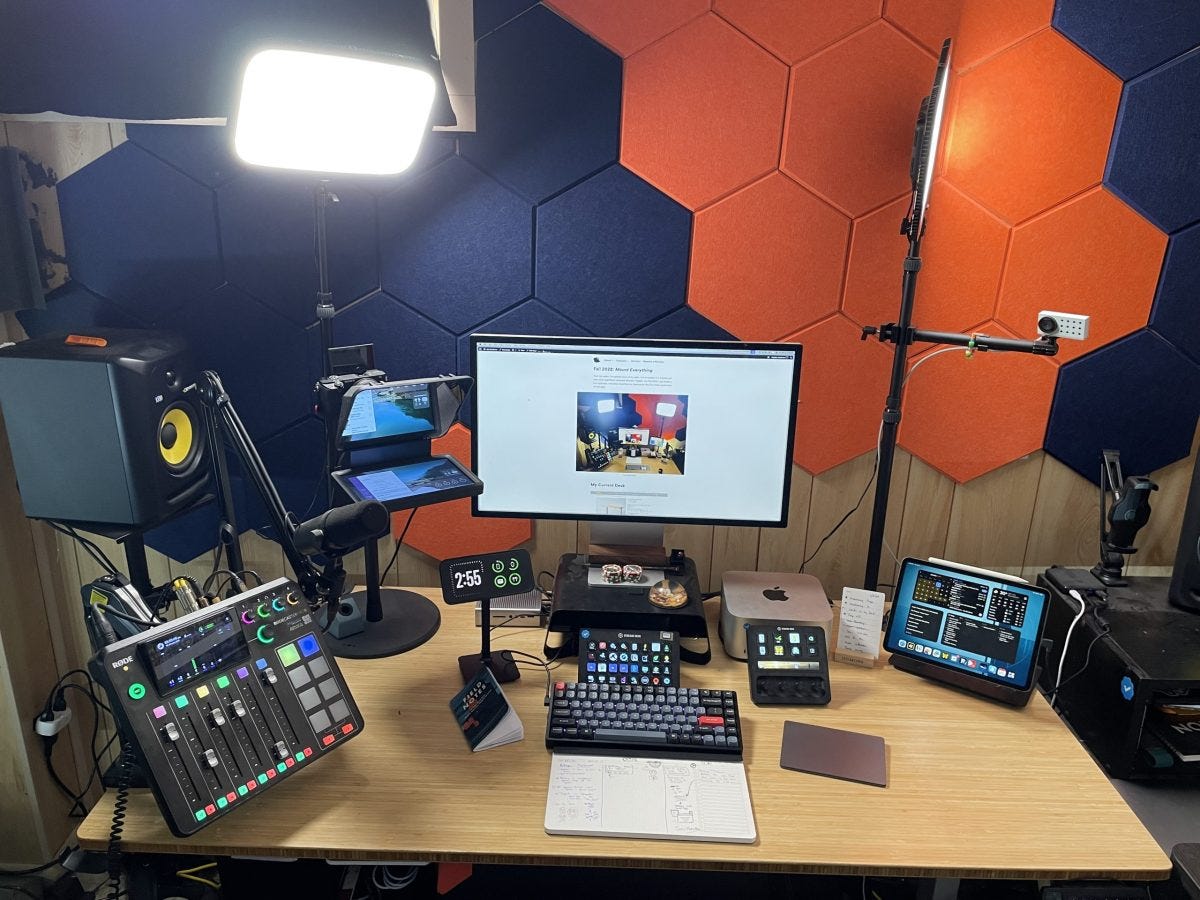
Over the years, I’ve posted tours of my desk. I try to update it 2-3 times per year when significant hardware changes happen. Since the last post (Fall 2022), I’ve made several changes to light positioning, I/O devices, and added one big piece to the puzzle.
Imagine walking into a room with a wall full of switches. The wall is broken up into columns, and you need to choose 2-4 switches from each column.
You can choose any combination, but some will be better than others.
That’s what making a membership website is like.
There are a million things to consider, from deciding on the levels and benefits, to figuring out how to get people to join. It can be overwhelming.
And let’s not forget about marketing – that’s a whole other ballgame. But fear not! I’ve got a solution for you. Uscreen is an all-in-one platform that makes it super easy to create a stunning website for your membership. And today, I’m going to show you how.
Let me start by saying before the WWDC Keynote, I wasn’t even remotely excited about Apple VR product.
The Meta Quest doesn’t excite me, and when I had Google Glass, I liked it, but I didn’t love it.
Suffice to say, Apple blew me away with their approach to the Apple Vision Pro. And the earlyreviews do not disappoint.
From a business/technology/create approach, here were my initial thoughts:
Apple shows you can go cheap, or you can go impressive. Meta announced a $500 version of the Quest mere days before WWDC. Part of the reason I wasn’t excited for Apple’s version is I’m not even remotely interested in the Quest or the Metaverse.
But Apple went high end, making the Vision Pro a full $3000 more than the cheaper version of the quest.
Not everyone will be on board, but there’s no denying that their product is impressive in such a way that Meta is gettingdraggedon Twitter. Meta basically owned this space for the past 5-7 years and Apple just kinda blew them up.
The lesson: Don’t just race to the bottom. You can create a high-end service and charge a premium if you impress.
They are reusing Aux tech created in VR for other apps. Earlier in the keynote, they showed an iPad feature where they tell you if you’re holding the screen too close.
I can’t help but think this was tech they developed for eye tracking on the Vision Pro, that made its way into other parts of the OS already.
The lesson: use your sawdust. When you create, look at each part of your process and see how you can use it.
They are smartly taking familiar experiences and moving them to a new medium first. One of the problems with the Meta Quest, that Sara Dietschy points out, is the interface and experience is unintuitive because it’s unfamiliar.
But Apple took several things into account when they design the UX for the Vision Pro:
We know how to use our eyes and hands
We know how to use the apps they demoed
The ideas behind the UX are familiar (make a call, send a text, browse a website, etc)
All of these combined means everything comes very naturally to us.
The lesson: Lower your learning curve, lower your barrier to entry, and you’ll create better, happier experiences for your customers.
They are never first to market, but they are much better when they enter. There’s a reason that post-1997 Apple is never first to market on a product.
They do a ton of research on real-world use. During the presentation, they used the term “cheek width” to point out they’ve studied faces.
But with the iPhone, iPad, Apple Watch, and AirPods, they took care to truly understand how people use the current crop of products, and improved upon them.
The VR/AR space is so controversial already; even though it’s been around for 10+ years, there’s still a lot of mainstream pushback.
Creating a whole other world is weird, uncanny valley, dystopian nonsense to a lot of people.
But Apple focused on how their product augments your current experience. You can still see your environment. You can still see real people in the real space. And they can see your eyes.
The lesson: There’s a lot of weight put on being first to market so you can make a name for yourself. But you could just be better. If you impress, reuse lessons you’ve learned, and create better experiences, you can blow up the competition.