Responsive Nav is a really nifty (and light-weight) Javascript plugin that will allow you to easily create an off-canvas navigation menu that slides down from off the screen. Here’s a quick and easy way to use an icon instead of your run of the mill plain text.
I’m working on a WordPress little side project where I am registering a new Custom Post Type and Taxonomy and came across this:
Fatal error: Call to a member function add_rewrite_tag() on a non-object...
After doing a Google Search to try to figure out what the issue is, all I came up with was “disable all of your plugins and reenable them to see which is the bad one.” That doesn’t help me because I know the one I’m developing is the bad one. My next step was just do to a Find for the term ‘rewrite’ and wouldn’t you know it, I came up with the the solution.
As it turns out, I was trying to register the taxonomy for my CPT before actually registering the CPT. If you ever run into the error yourself, try moving ” register_taxonomy” onto the line directly under the link that has “register_post_type.” My code was below it, but due to certain hooks I called, register_taxonomy was getting called first.
You might also want to prefix your taxonomies and CPTs; conflicts can arise that may also lead to that error. Happy Coding!
Over the last year or so I’ve been involved with a few major projects that required responsive design/development. One of the most important things to remember about a responsive design is that it’s not just good enough to make sure your design shrinks with a smaller browser on your computer. Presumably, you’re doing this because people will be accessing your website on mobile devices. Therefore, you have to do device testing! In this post I will outline what I think is proper testing practice.
Device Testing
I know this can be difficult since not everyone can get their hands on a wealth of devices. You may be lucky enough to be close to an Open Device Lab, but if not, you should try your best. Note: If you’re an “agency” or a “firm” that’s advertising being skilled in RWD, you need to pony up and buy the devices. RWD isn’t just a buzzword and it should be done right.
iPhone 4, 5
iPad 2 or new iPad
Android 4.0+ Phones: Galaxy Nexus, Galaxy Note II, S3 or S4, Droid Incredible (one of them), Droid DNA or Razor Maxx
Of-course, do this at your discretion and based on your own analytics. If 0% of your users are using Gingerbread, pre-4.0 phones might not be an issue for you. My list for Android device testing is based on some cursory stat-searching, including LifeHacker’s most common phones and stats directly from Google, which you can view on the Android Dashboards page (these update in real(ish) time). Finally, when it comes to RWD, device testing isn’t the only aspect. You also need to consider speed.
This should be nothing new, but with the whole host of new devices, it might be worth while to check out these browsers now:
The device’s native browser (Safari, Browser, etc)
Chrome on Android and iOS
Mobile Opera
Dolphin
Mobile Firefox
Also, make sure to test in IE 8,9, and 10! If you take a Mobile First! approach, keep in mind that IE8 does not support media queries.
Speed Testing
You cannot assume that everyone will have your great 70mbps connection (that’s a real max speed for me). People could be getting less than 1mbps at times, and that’s terrible if your site is huge. I would recommend testing on:
Broadband (wired or wifi connection)
4G (on multiple carriers if possible)
3G (on multiple carriers if possible)
4G and 3G while traveling
Wrapping Up
I understand that this can be cumbersome and cause a lot of work, and admittedly I haven’t been as diligent as I should be either. There are, however, way you can do this sort of testing without breaking the bank. Aside from what Brad mentions, you can do things like an open or closed beta, inviting people with different devices and connections to test on their devices and report back. I will generally have my friends and co-workers test designs for me. Or hey, you could always start an open device lab
I know it’s something I should have had for a while but I generally don’t feel my code is up to snuff. Seeing as I’ve been promising people my code, however, it makes sense. My username on @github is jcasabona. You can get to my repo using the link below.
Right now you’ll find 4 of my own projects: My WordPress Boilerplate theme, my “Professor” plugin (mentioned at WPSummit and NEPAWP), a simple Flexslider plugin I use (may release a pro version of that one), and a Reading List plugin.
In most cases, I will upload in progress or abandoned projects here in hopes that someone will pick them up. I must apologize for one thing however, and that’s my code isn’t documented very well. I may try to do that when I have time.
I have a ton of bookmark folders to help keep myself organized, though to be honest I usually bookmark something and then forget about it. So, while looking through some of my folders, I can across a good amount of web development resources I’ve been keeping. I’ve decided to share them.
Over the weekend I revamped this blog’s current theme a little bit, including adding custom styles for my Link Round-up lists. I achieved this by adding a simple piece of code within my loop to make each category a CSS class. Here’s how I did it.
Note: You need to be at least a little bit familiar with the WordPress API, and coding themes.
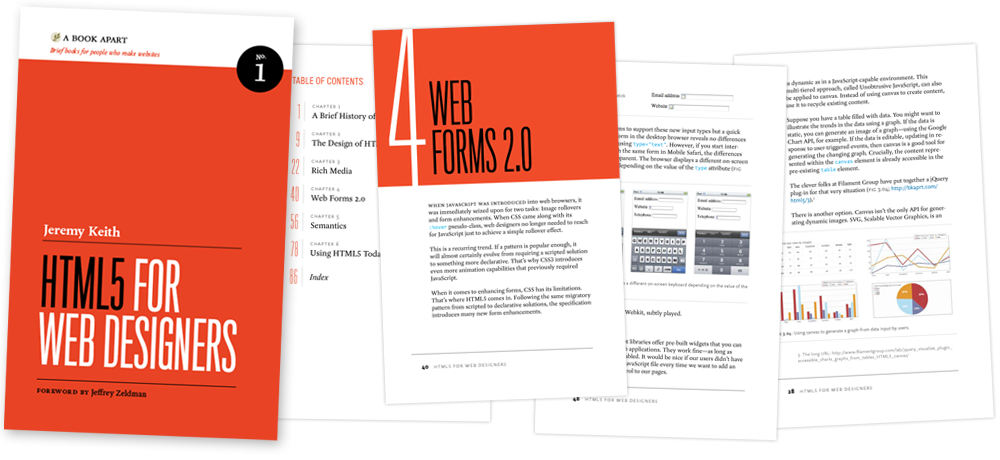
HTML5 for Web Designers by Jeremy Keith is a book I pre-ordered when it was first announced and I finally got around to reading it last week. I got it because it looked short & sweet, A List Apart does great work, and up until that point I didn’t know much about HTML5.
Often times I will be working on a WordPress theme that I want to live test, but I don’t want to reveal it to the world yet. The solution would be to throw up a temp page while you work. However, you may have noticed that throwing an index.html file in the WordPress directory or similar solutions break WordPress. Today I’ll tell you how to get around that.
It’s no secret that I love the show Home Improvement, especially if you know me personally or follow me on Twitter. As a freelancer I have the luxury of watching it everyday in the middle of the afternoon, and I got to thinking- there is a lot programmers and web developers can learn from Tim Taylor and his antics.
While working on the redesign to this blog, I wanted to add the “Interesting Stuff” column you see just to the right. Using the RSS feed widget built into WordPress would be perfect, except for the fact that it only updates ever 12 hours. In today’s Quick Tip, we fix that problem.
You want to build better systems, but you don’t know where to start.
That ends today. The Solo Systems Starter Kit will give you 4 systems every solopreneur needs to run a less chaotic business, the exact tools to create those systems, and automations + AI prompts and skills to get you to a calmer, more reliable business faster.