
|

Install Let’s Encrypt on WP Engine

I created a quick (less than 5 minute) video on how to get free SSL using Let’s Encrypt on WP Engine. Check it out! And to learn more about WP Engine, click here. Written Instructions after the jump!

  1. After logging into your website and choosing the site you want to install Let’s Encrypt on, click on SSL in the left nav menu.

  2.  From there, you’ll be taken to your SSL Certificate Management page. on the right, click “Add Certificates”

  3. Choose the first option: “Get Let’s Encrypt”

  4. Make sure all domains on the page are checked, agree to the Terms, and click “Request SSL Certificate”
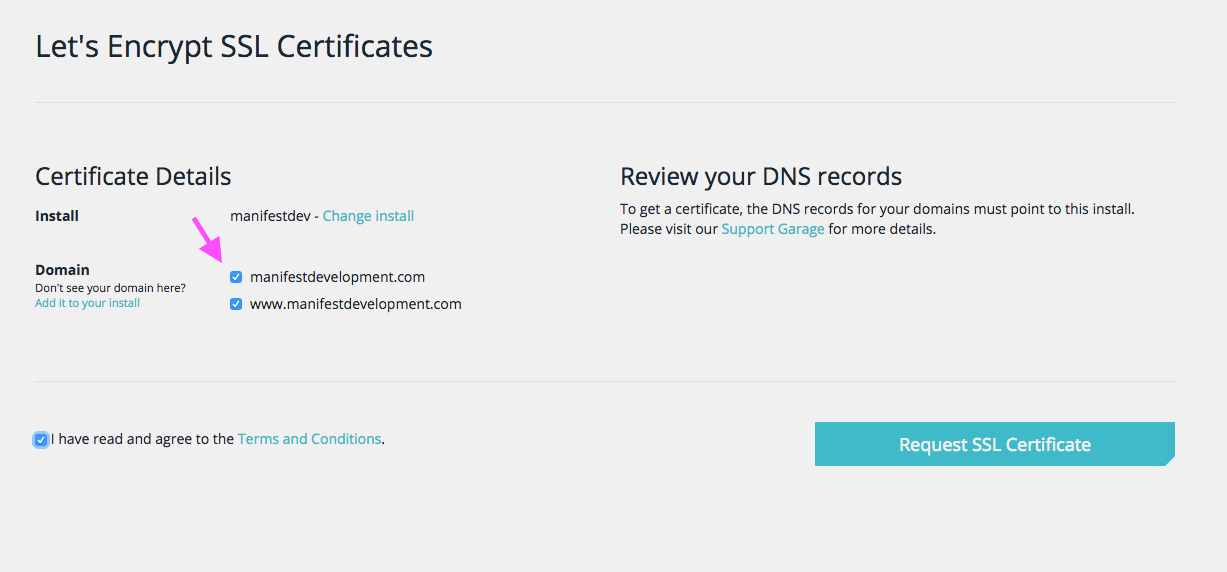
That’s it! It will take a few minutes to generate the certificates, and you will get an email when they are ready. From there you’re ready to use SSL on your WordPress site (check the video for a quick bonus).

Learn More about WP Engine

Similar Posts

  • My Slides from WordCamp Philly 2012

    Note: This article was published while I was in my early 20s. I was much younger and dumber. Please don’t hold it against me. One of the perils of having a 20+ year old website!Here you go! The slides from my talk, “Building a Simple WordPress Framework” at @WordCampPhilly are available for download, as well…

  • Announcing Memberships for Creator Courses

    A little over 3 years ago, I moved away from Scranton, PA. It was the right decision, of-course. I got married and my wife and I got a place closer to where she worked. After living there for over a decade (between college and post-graduate life), I can say I was ready. But there is…

  • | |

    Announcing WP Learning Paths

    Someone entering the WordPress space today may not know where to start, either with what to specialize in, or how to learn the skills. As a result, I wanted to create a simple resource for people to see what paths the can go down when it comes to learning WordPress, and where they can learn that craft. Today, I’m excited to announce WP Learning Paths.

  • |

    Do We Need ANOTHER WordPress Hosting Company?

    WordPress hosting companies are a dime a dozen these days, and if you’re going to be one, you need to differentiate yourself. This could be by offering managed WooCommerce hosting, adding on a theme shop for all customers, or creating a fantastic local development environment that integrates perfectly. When it comes to WordPress host WPX, there are 3 features that differentiate them from competitors.

  • Projects Roundup for February 7th.

    I’ve had quite a productive week as far as new work, releases, and new projects go and I’d like to share them here on the blog. A few weeks ago I made a decision to revamp the way I work, learn new things, and even adjusted my work schedule a bit to make me more…

  • |

    WordPress Plugins I Can’t Live Without

    I work with WordPress on a daily basis. By working within my own sites, setting up new sites, and testing new things, I come across a lot of WordPress tools. As a result, I have a group of WordPress plugins that I’ve come to rely on. There are some that are site specific (like WooCommerce…