Thoughts

  • Since the Giants last made it to the Super Bowl

    NY Giants

    Since 2000, the last time the Giants made it to the Super Bowl I’ve…

    • Learned how to develop websites
    • Started and stopped playing drums
    • Gone to my first concert
    • Gone to over 50 other concerts
    • Started my own business
    • Graduated High School
    • Gone to Ireland
    • Totaled a car
    • Held five different jobs
    • Graduated College
    • Started my Masters in Software Engineering

    It’s been a while. Let’s do this.

  • 2007 in Review

    My year-in-review post comes a few days early this year because tomorrow I leave for DC to meet up with some college friends for a weekend long New Year’s Eve celebration. It seems every year in this post I say how it’s been a benchmark year, and it’s usually not the case. Yes, I picked up some new skills here and there, but in retrospect, that seems to be business as usual. This year, however, was quite different.

    • I graduated college: In May, I graduated with a Bachelor’s of Science degree in Media and Information Technology. That is still a crazy thought for me.
    • I started Grad School: I am now attending my alma mater to attain my Master’s Degree in Software Engineering. This past semester was pretty difficult but I learned a lot that I will now be able to apply to my projects as a freelancer.
    • My Business Grew: In a huge way. Not only did a get a big number of clients and some great connections, I became more confident as a business owner and web developer. I also launched a new project, Into the Open, which I will really push after New Years. Finally, I am re branding my business entity with a new name, logo, and scope as far as what the business offers. If things go well, I might be an LLC before 2008 is out.
    • I lost 50 pounds: I made my annual resolution of losing weight/going to the gym and actually followed through. While that has slowed in the last few weeks, I will be getting back into it now that I am not quite as busy.

    I’d say since the time I started this blog, 2007 has been the most substantial in my personal and professional life. I’ve gained some great insight, a whole new skill set and grew a lot as a person, forming some very strong bonds with people and learning a lot about myself through them. So, good bye 2007 and here’s to 2008!

  • Rubik’s Cube

    rubiks cube

    Towards the beginning of the semester (thank God it’s over), my friend Jenn was showing me how to solve the Rubik’s Cube- something I never was and still am not able to do. Last night another friend of mine got me one for Christmas and I have more or less been thinking about it non-stop. I know there are countless resources that will tell you the solution, but I’d like to understand how it works instead of just memorizing an algorithm or two. My brother was showing me today how to solve it, but when I asked why we’d do it that was he’d say, “It’s how the algorithm is.” Jenn did tell me what I was trying to accomplish, but now that we are on Winter Break, it looks like I’m on my own.

  • Hot Tech Items this Christmas (2007)

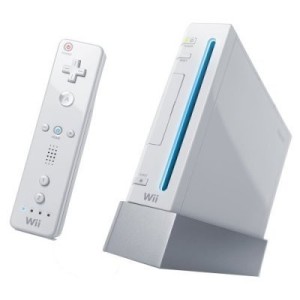
    Nintendo Wii

    With just about two weeks until Christmas, I am getting some questions about what fun tech toys would make good Christmas gifts. So here are a few things I feel will be a hit this holiday season.

    Nintendo Wii
    Over a year after it’s release, Wii is still selling very well and is almost impossible to find. It’s a fun system to play and there are games for everyone. And with new and upcoming releases like Mario Galaxy, Mario Striker Charged and Super Smash Brothers Brawl, who could pass it up?
    iPod Touch
    While I am not a fan of the iPod or Apple in general, the iPod Touch will be a hot item this year. It’s an iPod with internet capalbilities so you can download music right to your iPod. Or check your email. Or sports scores. Or the weather. You get the picture. As for me, I have my sights set on a new Zune.
    HD Player
    As prices drop for both HD DVD and Blu-Ray players, these should be a pretty hot item this year. I personally am a fan of HD DVD because of it’s backwards compatibility with DVDs and the fact that it’s supported by Xbox with the HD DVD Player drive. I though I guess it comes down to the movies and tv shows HD DVD and Blu-Ray have to offer.
  • A List Apart Web Design Survey

    ALA 2007 Survey

    Last week, popular web development website A List Apart (ALA) released the results of it’s 2007 Web Design Survey. I’ve spent the last few days reading over the 82 page document and found a good amount of the results interesting.

    • Over 80% of the respondents were White Males
    • 48% came from the USA
    • When asked if they were excited by their field, 43.6% said Fequently, 35% said Very Frequently, meaning 78.6% like what they do most of the time.
    • About 20% want to start their own business as their next move.
    • Of that 20%, 89.9% were men.
    • 47.9% are in the salary range of $20,000 – $80,000, where 52.3% have been in the industry 5 years or less.
    • 1/2 of the people in my age group (21-24) make less than $20,000. Something to consider is most people who graduate college are 21 or 22.
    • ALA found that Job Satisfaction increases with age. I think this is because when starting out, (for me anyway), you’re not doing the cool and exciting stuff you’d like to. My internships consisted mostly of fixing HTML, and not any real development.
    • Of those who saw an age bias, Under 21 and 21-24 combined made up for 70.2% of the respondents.
    • 22% of female respondents saw gender bias, where only 1.5% of male respondents did. (NOTE- that is 22% of the females, which made up ~16% and 1.5% of the males, which made up ~84%).

    What was most surprising to me was how big the gap between male and female respondents is. I knew the computing field is male dominated, but I didn’t think it was that one sided. This survey also gave me a pretty good idea of what I can expect as a salary once I get out of Grad School. You can download and review the results here, and if you are a web professional, I strongly recommend it. It’s extremely informative.

  • Scientists

    Over at Wired Blog, they are having a little running poll on the most influential, most unappreciated and best fictional scientists of all time. I’ve decided to weigh in with my picks:

    Best Fictional: Q
    This was a pretty tough decision as a nerd. There are scores of fictional scientists that are awesome (take for example, Doc Brown from Back to the Future). But I had to go with Q, the brain behind James Bond’s amazing gadgets and fun toys. It would be totally awesome if Q made stuff for me. I mean, who doesn’t want a class four grenade disguised as a ballpoint pen?
    Most Unappreciated: Philo T. Farnsworth
    Inventor of the first picture tube with his designs he created at just 13 years old, Farnsworth made monumental contributions to the media industry. However, due to corporate overshadowing by RCA, he never got recognition for his work until after his death in 1971.
    Most Influential: Issac Newton
    I was going to go with Einstein, however, Newton founded that thing called Calculus. Without out, We’d really have no basis for any modern physics and all of the work Einstein did.

    So what do you think? Who are your best fictional, most unappreciated and most influential scientists?

  • Blackberry Software

    bb8830.jpg

    Since getting my Blackberry, I have been scouring the Internet, looking for fun/free/useful software. There are a few programs I use everyday, but most of the useful stuff comes in the form of mobile websites.

    Let’s start with the software. The best of the blackberry software is Yahoo! Go. This is a clean, easy to use interface that nicely integrates your Yahoo! Account into your blackberry. Go allows you to get your news, sports scores, finance info, weather, email and even Flickr. On top of that it gives you your calendar and syncs your contacts right with your device. Also ranking on the free software list is TwitterBerry, which I mentioned in my Twitter post. Quickly and easily update your Twitter and get your friends timeline. The last piece of software is JiveTalk. This multi-client instant messaging program, while not free, is the best I have seen for AIM, MSN and Yahoo!. It also supports Google Talk, but I usually use the mobile version of GTalk for that. I did leave out the Google Mobile package, which comes with GTalk, GMail, Search and News. Frankly, while the GTalk and GMail programs are very nice, Yahoo! Go wins out for news and search.

    But as I said, most of the stuff I use is mobile web stuff. The sites I frequent on my blackberry include Facebook, Plaxo, MLB.com and Remember the Milk, all of which have very nice mobile sites. ESPN and CNN also rank on the mobile site list. Full functionality of these sites on my Blackberry is nice and convenient, especially with Remember the Milk and MLB. I love getting the play-by-play which I can’t catch the game on the TV or Radio.

    I have still yet to find: a good mobile FTP program (for free), a good version of Wikipedia for mobile use, and while I am not a huge fan, a mobile version of MySpace. I refuse to pay extra for a site I use for free.

  • 10 Things Every College Student Needs

    College Life

    As we approach August and people gear up to go back to school, it is time to think of what essentials students need at school. As a fresh college graduate reflecting on what got me through, I’ve realized there were a number things most colleges don’t tell you about. I’ve complied a list of items that were essential for me and I’d imagine apply to most college students.

    A Laptop
    Here is the big ticket item. I’ve written before on why colleges students should buy a laptop over a desktop; portability around campus, coming home, etc. It’s really about the freedom to take your laptop with you. Going away to college gives you a lot of freedoms, and the ability to work where you want should be one of them. The laptop I linked is one I recommended to my friend and my brother. If you do not like HPs, I’d at least recommend these specs: dual core processor, 80+GB Hard drive, at least 1.5GB RAM.
    An Mp3 Player
    On the topic of portability, one thing that I took everywhere with me is my mp3 player. I do not own an iPod for personal reasons (I don’t like them, I think they die to easily and I’m not a fan of iTunes), but I’ve linked one here in the title, and my personal one, a Creative Zen Vision:M. Either way, every college student needs one for use while studying, at the gym, or for some quite time in the dorm room.
    A Good Set of Headphones
    One thing I used (and still use) a lot are my big, over-ear headphones that drown out all ambient noise. Fact of the matter is if you’re going to use an mp3 player while studying, you’ll need headphones like these. Even studying in the crowded office where I worked, I was able to concentrate better with these headphones. Though admittedly if you will be using an mp3 player for the gym, these might be better. I have both sets, and use them both a good amount.
    A Digital Camera
    This is something I lacked my freshman year, and regretted it a lot. You will want a small point and shoot digital camera to take pictures when you are out with friends, or even of just random stuff on campus. This is another thing no college student can live without (or at least no college student with a social life).
    A USB Flash Drive
    Very important, especially if you will be working at multiple computers (and most students do). This will allow you to take your important papers, spreadsheets and presentations with you where ever you go.
    An External Hard Drive
    You wouldn’t believe how many people I know came to me saying things like “Joey, my computer crashed. How do I get my stuff back?” My usual response was, “It looks like you’ve lost everything.” That’s why I can’t stress enough the importance of backing up your information. A big enough external will allow you to back up all of your documents and any other non-recoverable information. I learned finally after my second hard drive crash.
    A Good Planner
    This is one they usually tell you about when going to school, but it’s still important to find a good one- one that works for you. It took me about 2 years to actually find a good one. I’ll always recommend a PDA because I’m a computer nerd, but as long as you find one that helps you stay organized, you’ll be in good shape.
    A Cell Phone
    Probably an unnecessary item to list, but essential none the less. A cell phone is a complete necessity for any college student, especially because now campuses (like the University of Scranton) are doing away with land lines in dorm rooms.
    A File Cabinet or Box
    Going back to staying organized, something that will help you keep track of the multitudes of papers, forms, etc. is important, especially because you don’t know which forms and papers will come in handy down the line.
    A Few Good Movies
    My Freshman year, we watched just about a movie a week. Good for when you don’t feel like going out, or just putting one on in the background, it’s always good to have a few movies around. And not just classics. Go for movies people probably have never heard of. My Freshman year I was introduced to Donnie Darko, Boondock Saints and Poolhall Junkies.

    Phew! I know it’s quite an expensive list, but these are all things you will want while at college, even if you don’t realize it at first. The surprises for me were the Flash Drive, the Digital Camera and the file box. But once I got them, I used (and still use) them over and over again. Are there any essentials I am missing? Or maybe something you feel shouldn’t be on here?

  • Primary Email

    Primary Email Poll

    A recent poll on Facebook shows that the primary email of all people polled is Hotmail (grrr). What’s even more interesting is the demographics. If you go to the page (you do not have to log in to view it- Kudos on the, Facebook!) you will see that there is a big difference between sexes, notably the gap between male and female respondents for Hotmail (35% and 42% respectively) and Gmail (22% and 11% respectively). I am not sure what to make of these numbers and why so many females choose Hotmail over Gmail.

    The other interesting numbers are with age. It seems Hotmail gets people 13-17 and 25-35, where Employee and School email dominates the 18-24 realm. This is understandable as maybe people at least 25 have been using Hotmail for some time. It was the de facto email client for quite some time. And of course, 18-24 now-a-days have to use school or employee email to survive.

    I’d like to see some input on what people use and why. (Maybe this is something better fit for LifeHacker, but what the heck). I for one use GMail and have all my mail forwarded there. I wrote a review a few years back when it first came out, but with almost 3GB storage, the ability to email from other email addresses and great organization features, there isn’t much better.