The best way to answer, “Who are you and what do you do?”

I want you to think about the times you make introductions to people. Maybe you’re introducing a coworker to your spouse, or a friend from…

I want you to think about the times you make introductions to people. Maybe you’re introducing a coworker to your spouse, or a friend from…

Imagine you walk into a new UPS store that opened up in your town, and you need to ship a gift to your best friend, in Grand Rapids…
When I was in 5th grade, I had to do a report on a family member who immigrated to the United States.
My maternal grandfather, Louis (Luigi) “Pop” Addorissio, was the only family I knew who did that. He came to the US from Italy in 1949, at the age of 19.
I sadly don’t remember any of the questions I asked, or the answers he gave, and that report is lost to the annals of history.
I did manage to ask him one question when I was about 20 years old about what it was like growing up in Italy during WWII. He made a comment about how Mussolini actually did a lot for the country, but he, “got in with the wrong crowd.”
The wrong crowd indeed, Pop.
As an aside, something incredibly interesting about Italian immigrants in the 1940s-1950s was that they were very focused on “becoming American” (likely due to prejudice against them). Pop learned English ASAP, and didn’t teach his kids Italian because he felt it would be a hinderance to them.

He sadly passed away in 2009, and one of my biggest regrets is not capturing more of his stories. I can imagine myself, standing outside with him, both of us smoking cigars (something I got into thanks to him).
Then, I would probably just asked questions and wrote down the answers. But today, I’d bring my Zoom H5 recorder over, with a couple of microphones, and capture our conversation that way.
Storytelling is such an important part of the human experience?—?something that holds together the very fabric of society. It can motivate crowds to act, and it can keep familial traditions and legacies.
Podcasts offer the perfect vehicle for storytelling. You’re focused on the words and how they’re delivered, vs. relying on visuals.
That’s why I’m so excited about the new product we’ve launched at RSS.com HQ: gift cards.
You likely have a friend who’s said, “I need to start a podcast.” And I know from experience that many folks don’t know where to start.
These gift card are prefect for them, as well as the aspiring marketer, content creator, and storyteller.
But beyond that, they’re also perfect for the family member, friend, or loved one whose stories you want to live on.
In a world where we’re so focused on the viral, short form, and ephemeral, we could use a more of this type of content. The stories that can’t and won’t always get told, unless we capture them and pass them on to future generations.
I would have loved for my kids?—?including his namesake, my son Louis?—?to hear Pop’s stories, in his own words. Now they have to settle for the very few I have, and a pretty poor impression.
If you’re looking for a unique gift for the person in your life whose stories need to be heard, I strongly recommend you check out RSS.com’s gift cards.
Disclosure: I am the Evangelist for RSS.com…but this is still a cool, one of a kind gift.

Give the Gift of Storytelling Through Podcasting was originally published in Thoughts from Joe Casabona on Medium, where people are continuing the conversation by highlighting and responding to this story.
I’ve begun the process of moving my entire operation from Airtable to Notion, and while most of it has been smooth sailing, soon I’m starting what will likely be the most difficult move: my podcast production process.
I’ve walked through various parts of the process, like booking guests, but Airtable is basically the brain of the operation, touching every part of the episode’s journey.
So I’ve decided to do some pre-planning, and share with you what I’m thinking. Here’s the video walk through:

Over the weekend, I was arguing with my 6 year old daughter about why Friday by Rebecca Black is an objectively bad song.
It’s been quite a week, my friend.
Last week I started to feel sick, undoubtedly catching the plague my children have had for the past 2 weeks. I was the last one to fall.
Happily, I’m feeling better, but my entire week was thrown into disarray.
And it’s during the disarray that you see the cracks in your processes. While mine are pretty good, I’m growing tired of some of the tools I’m using.
In-fact, earlier this week on social media, I posted that I’m moving most of my operations to Notion from Airtable.
This is probably surprising, considering not 5 months ago, I wrote a piece proclaiming the exact opposite.
So what changed, and why am I deciding to make the transition despite the considerable technical debt?
When asked on Threads what inspired the change, I responded with this:
Over the last year or so they’ve made changes that took features away from paying customers, and added features to the free plan that paying customers STILL have to pay for.
Just feels like they’re not interested in helping small business owners anymore.
I like Notion because it’s flexible, used by a lot of people, and has been adding great features (like automations).
I also feel like I know what I’m paying for, and when I’m paying, when I pay for Notion.
And while that’s mostly the case, there are a couple of other reasons.
For one, I find myself spending most of my time in Notion these days. I’ve already moved a bunch of my operations there, and people I work regularly with, like RSS.com, and my assistant, Jordan, already work in Notion.
I’ve also moved family stuff into Notion, and it was very easy to share that stuff with my wife.
When I do open Airtable, it now feels cumbersome. I can’t view everything I need to view in one spot (even with interfaces), and it’s slow.
But, while this certainly feels like a major move (that I still need to make the checklists for), it’s actually a smaller part of bigger changes I’m making moving into 2024.
See, my entire tech stack is changing. Here are the switches I’m making:
I’ll likely write about this in greater detail in future articles, but taking out task manager (which I feel like I change a little too often), I’m moving to Squadcast because it’s now including with my Descript subscription, and I’m displeased with the direction Riverside is going in.
And the switch to SavvyCal is related — they have very tight integration with Squadcast, which is one of the most important parts of my guest-booking workflow.
Of-course, all of this requires considerable changes — so why now?
It’s a combination of cost-savings and frustration. I’ve been increasingly frustrated with Airtable, which is what pushed me to test Notion in the first place.
I don’t like how much I’m paying for Airtable, and like even less that they seem to be taking more features away from the plan I’m paying for.
Couple that with the fact that Notion is more affordable, even with full-access guests, and that they just rolled out their own Automations, and it felt like a good time to jump.
All of the moves will save me $450 annually, and will end up saving me time too. Not bad.
So when do you burn it all down and start over?
I think it’s when the frustrations start getting in the way of you working efficiently.
If what you have is working, and you can continue to afford the tools you use, leave them be.
But if your processes suddenly start fighting you, or there’s a consolidation of tools (like with Descript/Squadcast), you should consider changing.
It’s also worth noting that you’re likely not rebuilding your entire process stack like I am. But if you are switching a couple of things all at the same time, you likely don’t have to repeat some of that switch work.
For example, Moving from Airtable to Notion will requirement me to update my Guest onboarding automation anyway — so I’ll be able to update it both for Notion and SavvyCal.
If you’re worried about the level of effort — well don’t worry. I’ll be documenting that for you 🙂
Something I’ve been toying around with a lot more since the iPhone 15 Pro came out is the Action Button.
Right now on my phone, it simply adds a new task to Things 3 via Shortcut.
But on my Apple Watch Ultra, I always felt the perfect use case was to dictate a note?—?also via Shortcut, where I explicitly have the Dictate Text action. Otherwise, the watch inexplicably defaults to the swipe keyboard.
Press a button, say some stuff, and know it will be safely stored in my favorite notes app, Bear.
This shortcut has great utility in the car as well. I can just shout, “New Note” into the void and capture an idea.
But there’s one problem: Bear Notes doesn’t support Shortcuts on Apple Watch.
It feels pretty wild to me, because their Apple Watch app is well-thought out, if not good.
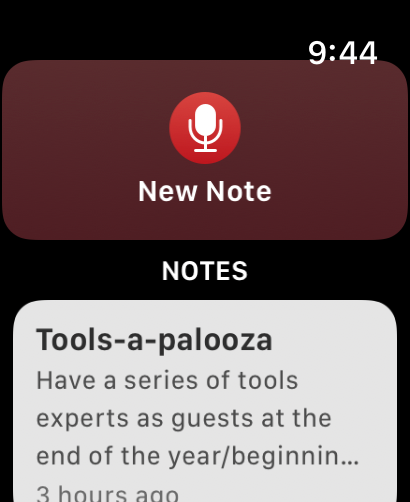
But alas, when I try to use the new note Shortcut, I get an error message because Bear Notes presumably doesn’t support Shortcuts on Apple Watch.
However, while writing this article, I made a discovery. Bear has 2 ways to create notes: “Create Note,” and “Create Bear Note.”
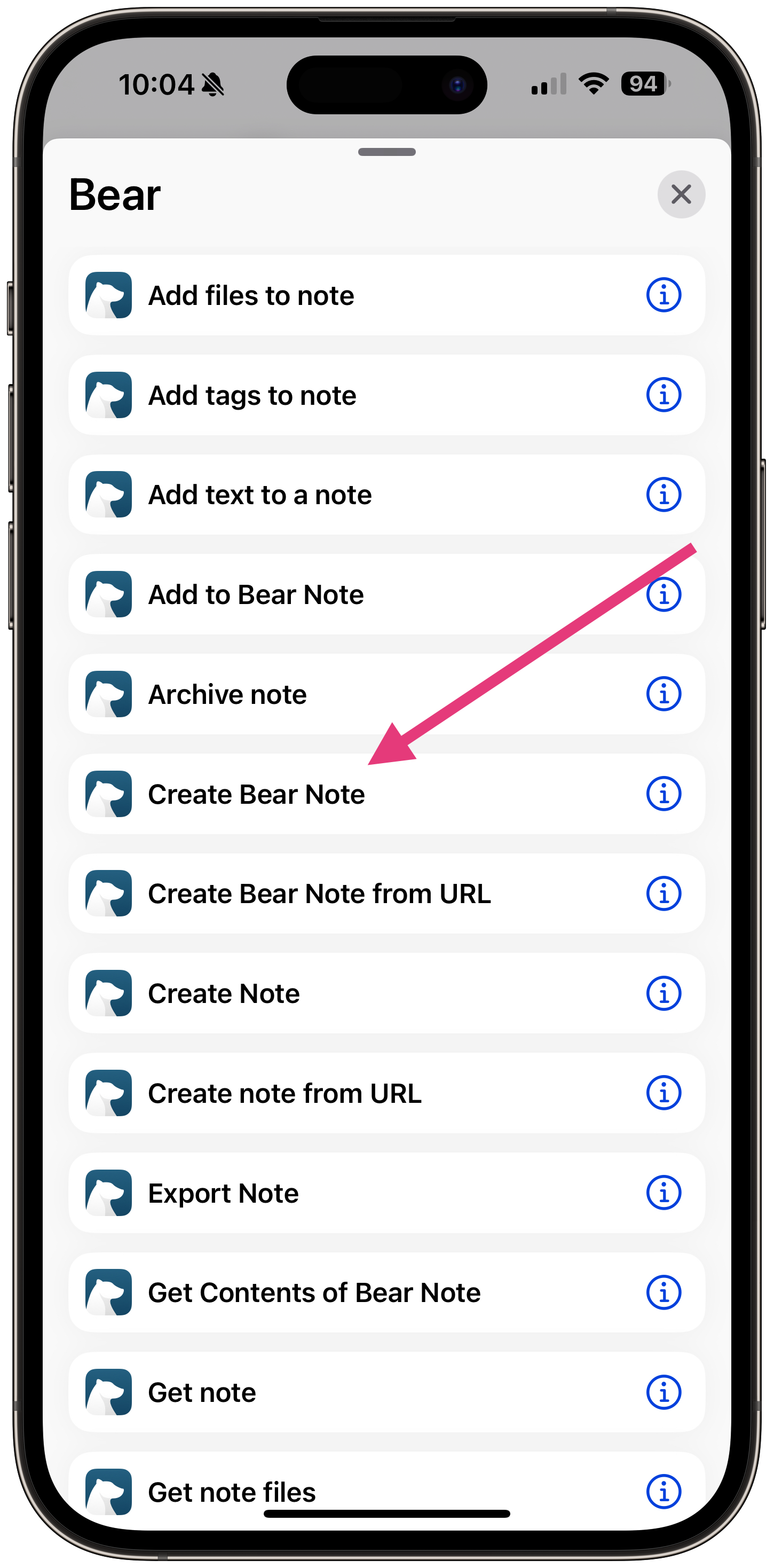
The Create Bear Note Shortcut action works on the Apple Watch.
That’s a huge relief, as my workaround was:
Less than ideal.
But the plot thickens. On Bear’s own Shortcuts support page, they have this message:
Apple sometimes automatically creates “legacy actions” for apps that are not under our control. We recommend avoiding these actions: Create Bear Note, Create Bear Note from URL, open Bear Note, and Search in Bear.
SO they want us to use the “Create Note” action?—?even though it doesn’t work on Apple Watch.
I’m not sure what the moral of the story is. Use Create Bear Note at your own peril?
I’ve reached out to Bear support and will update this if I find out anything new!
I Love Bear Notes, but it Doesn’t Have Shortcuts Support on Apple Watch (or Does it?) was originally published in The Automated Solopreneur on Medium, where people are continuing the conversation by highlighting and responding to this story.
Over the years, I’ve published a great many gift guides on my blog. From freelancers, to podcasters, to working from home, and even my…

A while back I asked podcasters on Twitter if they have a mailing list. I got the usual smattering of answers, but one stood out: “I’m…
I’ve been thinking a lot about podcast calls to action lately. I even talked about it on my new daily podcast, Podcast Workflows.
Increasingly, I feel my stance on a pre-roll CTA, before you deliver any value, is bad. It’s like asking for the sale before someone knows who you are. It’s like asking blind date.
Some people are OK giving it a try and hoping for the best. But most people want to know a little more before they’re in.
I’ve also stated that calls to action at the end of the episode generally don’t work, as most people have left by the end.
I still think that’s true — but I’ve decided to experiment with post-roll ads. Here’s why, and how I’m doing it.
First, I’m limited this experiment to Podcast Workflows, in part because 4/5 episodes each week are less than 7 minutes long. Listeners are much more likely to stick around until the end.
Next, I’ve specifically created a post-roll ad — calling attention to the listener that this is the last thing they’ll hear, by saying “ Hey before you go…”
I tell them they just listened to something to help them improve their podcast processes, and I have something else for free that can help them do the same thing.
I deliver the value, then I make the ask.
Initial impressions are good. There aren’t that many listeners of the podcast yet — I want to build the library before I really start promoting it — but it seems like about 1/10 listeners are signing up after hearing the post-roll.
I’m tracking this 2 ways:
https://podcastliftoff.com/freebie/?utm_source=podcastworkflows&utm_medium=podcast&utm_campaign=postroll&utm_content=CTAThis combo allows me to create a segment of anyone who came from the Podcast Workflows podcast.
I’ll mostly use that segment to quickly get a number of subscribers (since November 1st, when I rolled out the post-roll) are coming from the post-roll ad.
My hypothesis is that I’ll capture about 5-10% of listeners this way, for the exact reasons I stated before: the episodes are short, so consumption is high, and I’ve delivered value.
For other shows, my goal is still to find a good place in the mid roll for the CTA — but I’m guessing it will actually be better to do it towards the beginning, or more organically.
I’ll use the same method to track efficiency: UTM codes and custom fields.
In-fact, UTM codes will be such a crucial part of my linking strategy moving forward that I’m thinking of building a text expander snippet or shortcut to easily build them.
More on that at another time though.
Get the exact framework I used to go from burnt out to taking 6 weeks off to spend with family in less than 12 months Join my mailing list: