
How I’m Staying Organized in 2017

It’s no secret I love stationary. I recently posted a photo of the above notebooks on Instagram and a grammar school friend remembered my affinity for pads and pens even then; she told a story of how I convinced her to buy this cool troll pen at a book fair in first grade.
I’m also constantly looking for ways to stay organized and keep on task. I need to because I have a lot of irons in the fire:
- I have a full time job
- I’m developing online courses for myself and others
- I host a weekly podcast
- I have 2 blogs
- I have a baby girl on the way
I need a few tools to make sure I don’t lose track of what I need to do and when. There are a few tried and true tools I use, and a couple of new ones I’m trying this year.
Bullet Journaling
This was a system I discovered a few years ago thanks to one of my favorite podcasts, The Pen Addict. It shows you how to keep track of monthly, weekly, and daily tasks, lists, and much more. It gives you a dead-simple system of icons and indexing to keep everything straight. And the best part is it’s fully customizable.
I’ve customized the system a bit over the years through some trial and error, but here’s what I’ve settled on:

I use the Leuchtturm1917 Dotted. It’s the recommended one, as well as a great notebook.
At the front of the notebook, I’ll have a section where I transfer notes from old to new, add lists & collections, and goals for the year.
I will have dedicated pages to Months, Work Weeks, and Weekends. I use something else for daily tracking.
I’ll try to keep note-taking to a minimum, but I will add lists and more organized ideas, noting the pages in the index.
I try to keep the same notebook all year, & the end of 6 months, I’ll “reset” — add a blank page, then new goals and collections.
I’m a huge fan of this system. It’s a nice way to not only keep track of my monthly and weekly tasks, but look back every few months and see what I’ve accomplished, and what I still need to accomplish.
Field Notes
Since I don’t always have my bullet journal on me, but still prefer writing notes in a notebook, I always have a Field Notes Brand notebook in my back pocket. These things get pretty beat up, but they are great for quick notes and sketches.
Hobonichi Techo
In the photo above, you may notice that I have 2 notebooks. The bottom one is my Bullet Journal. The top one is my Hobonichi Techo; this is a smaller page-a-day planner that I’ve been clamoring to get for a while. I finally pulled the trigger this year.
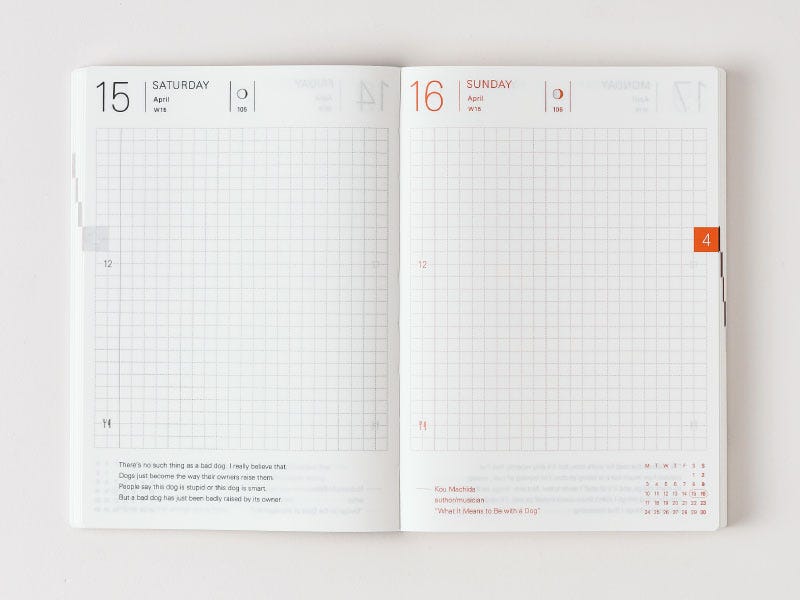
These planners are made by a company in Japan and they are of great quality and size. I was actually a bit worried I’d find the book too small (it’s an A6) but it’s just right!
Because it’s important for me to track daily tasks, appointment, and hours (as in, time I spent working on something), I wanted a planner than gave me a little more rigidness than bullet journaling. I wanted to easily lay out hours on pages clearly marked by day for easy reference. I’ve started using this for the Daily Plan Bar that Mike Rohde wrote about in December. I’ve really enjoyed how sturdy and compact the planner is. My only wish is that it had a bookmark like the Leuchtturm1917.
Finally, there are lots of cool covers and accessories for it. Right now I’m using just the planner, but it’s nice to know that if I wanted a case, I have options.
The Hobonichi website is a little confusing, so here’s an Amazon link to the planner.
Pens
I love me some pens. Here’s a short list of the ones I like to use:
Bear Notes
As far as digital tools go, Bear Notes is my favorite note taking app. It’s available for iOS and MacOS, and it’s beautiful. It’s easy to use, it syncs quickly, and it’s relatively cheap. I’m a big fan.
Fantastical
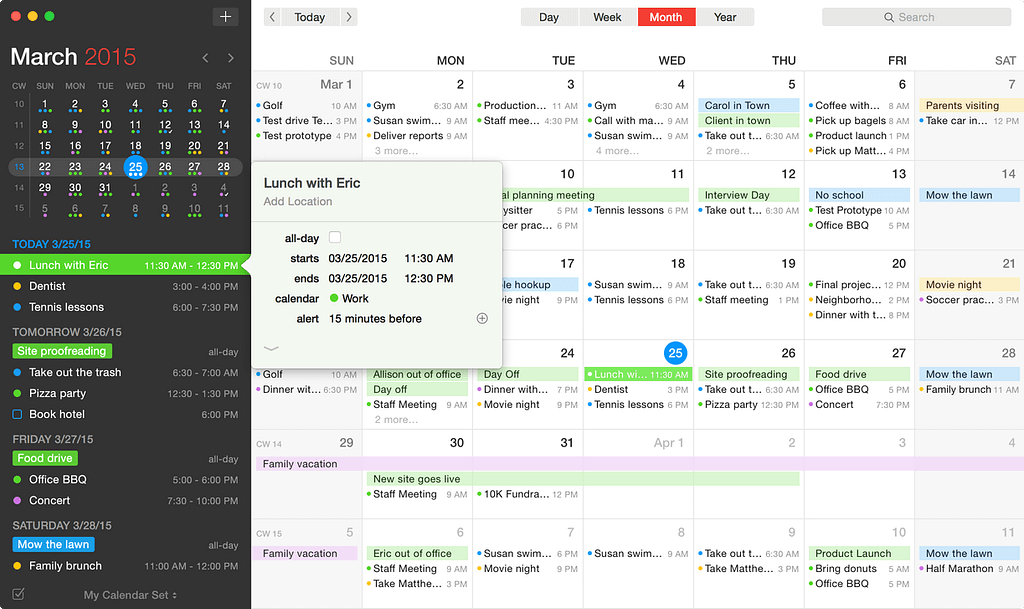
I rely heavily on my calendar from day-to-day and of everything I’ve used, Fantastical is the best. The desktop app is a bit pricy ($40) but worth it in my opinion. It integrates well with both Google and MacOS, and it’s companion iOS app is great.
Calendly
Related is perhaps my favorite new tool, Calendly. It’s a web-based scheduling app that makes setting up appointments super easy. I use it for scheduling guests for my podcast as well as consults and other conversations I might be having. Connect your calendars, set available times, and send out a link to anyone who wants to schedule time with you. Calendly will adjust for time zones, follow-up with both you and the person you’re meeting with, and add the event to both of your calendars.
So Far so Good!
This system has been great so far. The Hobonichi Techo has been a great addition to my workflow, and Calendly has been a game changer for me. I absolutely love it.
What tools are helping you stay organized? I’d love to hear about them!

How I’m Staying Organized in 2017 was originally published in Thoughts from Joe Casabona on Medium, where people are continuing the conversation by highlighting and responding to this story.