
gadgets

  • Zune vs. iPod

    Zune vs. iPod

    It’s the match up of the century. Or at least of right now. I write this post not as just a topic, or to announce to the world how big of a MS Fanboy I really am (you should know that already). I write this because I honestly believe the 2nd generation Zune is a better product. It’s not just about interface, size, etc. either. There are three major features the Zune offers that the iPod does not. But that’s all in due time.

    The Basics: This point is kind of moot, because people will strongly disagree with me, fanboys and not-so-fanboys alike. However, I feel the entire GUI of the Zune is better than the iPod’s. I can navigate through my files much faster because of the button and menu layout. The click-wheel of the iPod is nice, but the touch 4-way direction pad is nicer and the GUI is nicely complimented by it. The Zune Player is better than iTunes. First, it’s lighter- less going on, eats up less memory. It’s also very slick. The transitions are nice and the way everything is laid out is simple and intuitive. Truth be told, I still don’t know how to make a playlist in iTunes. Everything just feels cluttered in iTunes. And auto syncing the library the first time a new iPod connects to it is a train wreck. Zune Player prompts you every time a new Zune is connected. But now, onto the real stuff…

    Two-way Syncing: This is something iTunes/iPod desperately need. When I connected a second Zune to my computer, I was able to copy songs from the Zune to my music library no problem. Quick and simple. Why hasn’t Apple done this yet? As of right now, you need a 3rd party program if you want all your music copied correctly.

    Wireless Sync: Have a WiFi network? Set your Zune up to connect to it and add music to it from anywhere within range. Even with the iPod Touch and iPhone, Apple hasn’t made this feature available, and I think it’s very useful. Even if your Zune isn’t directly connected to your computer, it’s still being synced whenever you change a playlist or get a new podcast. Speaking of…

    Podcasts: This is a surprising featuring, in the sense that they offer it and that I use it. The Zune makes it extremely easy to get and sync podcasts with your Zune. Just subscribe to a podcast with Zune player and when a new one is made available it’s automatically downloaded and synced to your Zune. As far as I know, this is not a feature offered by iTunes.

    The Social: I think this is the coolest feature. For Zunes in range, you can see what they are playing and send them songs, pics, vids and podcasts. Sure, there is the three-play rule on songs, but there are also ways around that. The idea of sharing music on the fly like this is pretty awesome. My friend wanted me to hear a song the other day so he just sent it to me and I listened to it right there. If Apple isn’t planning on releasing something like this, they should- especially because the iPod is much more popular than the Zune.

    So there you have it. Five (at least three solid) reasons why the Zune is better. Of course this is based on my limited interaction with the iPod/iTunes, so if I am mistaken on some things, or they have changed, please let me know in the comments!

  • Microsoft Zune (gen II)

    Zune

    This Christmas I got an 8GB Zune, as my 2 Year Swing is rapidly reducing to the 1.5 year swing. After 18 months with the Creative Zen Vision:M I realized I didn’t really need 30GB of space for my music, and wanted a smaller model. I thought the new Zune looked excellent, and I was not wrong.

    I want to break this down into two parts- the Zune and the Zune vs. the iPod. The reason being people, I feel, buy the iPod solely because of name recognition. I honestly feel the Zune is a better product- but I will get to that later on. Right now, the Zune as a device.

    • Interface: Extremely intuitive. 3 buttons, clearly labeled, and the direction pad is touch making navigation very quick and easy. The software interface is excellent. One menu with bigger fonts and then top navigation for the sub-menus. Smart idea by Microsoft. And, it looks great. You really feel at home using the Zune.
    • Zune Player: I think even if I didn’t have a Zune, I’d use the player. It’s light weight, visually stunning and super easy to use. I’d also like to attribute my listening/watching podcasts to Zune player, as it makes podcasting (word?) very easy. Integration with any number of Zunes is a snap. And don’t worry about losing your music to autosync, because the Zune player prompts you for auto or manual sync. Furthermore, it allows two-way sync, which means I can take music from the Zune and put it on my computer.
    • Functionality: I could go on for days about the Zune’s functionality. The features it offer are second to none. First, the social. This function is awesome. You can tell what other Zunes are near, what they are playing and you can send music from your Zune to another Zune. Sure, it only allows for three plays, but you can’t scrutinize Microsoft for not wanting the RIAA on their back. This can really open up a lot of possibilities for the future of mp3 players, even if no one talks about it. The other awesome feature is the built in WiFi. If you have a wireless network in your house, just connect the Zune to that network (using Zune Player) and you can send music, videos and pics to your Zune wirelessly, anywhere the network reaches. Excellent.

    All in all it’s an excellent device. In the next post I will talk (in some detail) about why the Zune is better than the iPod, though you might be able to tell I set myself up pretty well in this post.

  • Hot Tech Items this Christmas (2007)

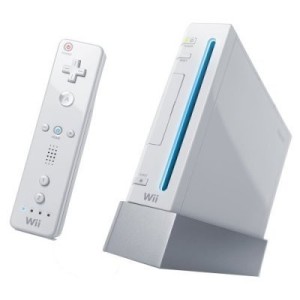
    Nintendo Wii

    With just about two weeks until Christmas, I am getting some questions about what fun tech toys would make good Christmas gifts. So here are a few things I feel will be a hit this holiday season.

    Nintendo Wii
    Over a year after it’s release, Wii is still selling very well and is almost impossible to find. It’s a fun system to play and there are games for everyone. And with new and upcoming releases like Mario Galaxy, Mario Striker Charged and Super Smash Brothers Brawl, who could pass it up?
    iPod Touch
    While I am not a fan of the iPod or Apple in general, the iPod Touch will be a hot item this year. It’s an iPod with internet capalbilities so you can download music right to your iPod. Or check your email. Or sports scores. Or the weather. You get the picture. As for me, I have my sights set on a new Zune.
    HD Player
    As prices drop for both HD DVD and Blu-Ray players, these should be a pretty hot item this year. I personally am a fan of HD DVD because of it’s backwards compatibility with DVDs and the fact that it’s supported by Xbox with the HD DVD Player drive. I though I guess it comes down to the movies and tv shows HD DVD and Blu-Ray have to offer.
  • Blackberry Software

    bb8830.jpg

    Since getting my Blackberry, I have been scouring the Internet, looking for fun/free/useful software. There are a few programs I use everyday, but most of the useful stuff comes in the form of mobile websites.

    Let’s start with the software. The best of the blackberry software is Yahoo! Go. This is a clean, easy to use interface that nicely integrates your Yahoo! Account into your blackberry. Go allows you to get your news, sports scores, finance info, weather, email and even Flickr. On top of that it gives you your calendar and syncs your contacts right with your device. Also ranking on the free software list is TwitterBerry, which I mentioned in my Twitter post. Quickly and easily update your Twitter and get your friends timeline. The last piece of software is JiveTalk. This multi-client instant messaging program, while not free, is the best I have seen for AIM, MSN and Yahoo!. It also supports Google Talk, but I usually use the mobile version of GTalk for that. I did leave out the Google Mobile package, which comes with GTalk, GMail, Search and News. Frankly, while the GTalk and GMail programs are very nice, Yahoo! Go wins out for news and search.

    But as I said, most of the stuff I use is mobile web stuff. The sites I frequent on my blackberry include Facebook, Plaxo, MLB.com and Remember the Milk, all of which have very nice mobile sites. ESPN and CNN also rank on the mobile site list. Full functionality of these sites on my Blackberry is nice and convenient, especially with Remember the Milk and MLB. I love getting the play-by-play which I can’t catch the game on the TV or Radio.

    I have still yet to find: a good mobile FTP program (for free), a good version of Wikipedia for mobile use, and while I am not a huge fan, a mobile version of MySpace. I refuse to pay extra for a site I use for free.

  • 10 Things Every College Student Needs

    College Life

    As we approach August and people gear up to go back to school, it is time to think of what essentials students need at school. As a fresh college graduate reflecting on what got me through, I’ve realized there were a number things most colleges don’t tell you about. I’ve complied a list of items that were essential for me and I’d imagine apply to most college students.

    A Laptop
    Here is the big ticket item. I’ve written before on why colleges students should buy a laptop over a desktop; portability around campus, coming home, etc. It’s really about the freedom to take your laptop with you. Going away to college gives you a lot of freedoms, and the ability to work where you want should be one of them. The laptop I linked is one I recommended to my friend and my brother. If you do not like HPs, I’d at least recommend these specs: dual core processor, 80+GB Hard drive, at least 1.5GB RAM.
    An Mp3 Player
    On the topic of portability, one thing that I took everywhere with me is my mp3 player. I do not own an iPod for personal reasons (I don’t like them, I think they die to easily and I’m not a fan of iTunes), but I’ve linked one here in the title, and my personal one, a Creative Zen Vision:M. Either way, every college student needs one for use while studying, at the gym, or for some quite time in the dorm room.
    A Good Set of Headphones
    One thing I used (and still use) a lot are my big, over-ear headphones that drown out all ambient noise. Fact of the matter is if you’re going to use an mp3 player while studying, you’ll need headphones like these. Even studying in the crowded office where I worked, I was able to concentrate better with these headphones. Though admittedly if you will be using an mp3 player for the gym, these might be better. I have both sets, and use them both a good amount.
    A Digital Camera
    This is something I lacked my freshman year, and regretted it a lot. You will want a small point and shoot digital camera to take pictures when you are out with friends, or even of just random stuff on campus. This is another thing no college student can live without (or at least no college student with a social life).
    A USB Flash Drive
    Very important, especially if you will be working at multiple computers (and most students do). This will allow you to take your important papers, spreadsheets and presentations with you where ever you go.
    An External Hard Drive
    You wouldn’t believe how many people I know came to me saying things like “Joey, my computer crashed. How do I get my stuff back?” My usual response was, “It looks like you’ve lost everything.” That’s why I can’t stress enough the importance of backing up your information. A big enough external will allow you to back up all of your documents and any other non-recoverable information. I learned finally after my second hard drive crash.
    A Good Planner
    This is one they usually tell you about when going to school, but it’s still important to find a good one- one that works for you. It took me about 2 years to actually find a good one. I’ll always recommend a PDA because I’m a computer nerd, but as long as you find one that helps you stay organized, you’ll be in good shape.
    A Cell Phone
    Probably an unnecessary item to list, but essential none the less. A cell phone is a complete necessity for any college student, especially because now campuses (like the University of Scranton) are doing away with land lines in dorm rooms.
    A File Cabinet or Box
    Going back to staying organized, something that will help you keep track of the multitudes of papers, forms, etc. is important, especially because you don’t know which forms and papers will come in handy down the line.
    A Few Good Movies
    My Freshman year, we watched just about a movie a week. Good for when you don’t feel like going out, or just putting one on in the background, it’s always good to have a few movies around. And not just classics. Go for movies people probably have never heard of. My Freshman year I was introduced to Donnie Darko, Boondock Saints and Poolhall Junkies.

    Phew! I know it’s quite an expensive list, but these are all things you will want while at college, even if you don’t realize it at first. The surprises for me were the Flash Drive, the Digital Camera and the file box. But once I got them, I used (and still use) them over and over again. Are there any essentials I am missing? Or maybe something you feel shouldn’t be on here?

  • The 8830: Multimedia and Tethering

    Media Player on the Blackberry

    Week 2 into being a Blackberry user and I am still very happy with the device. Two major things I have tested since the last post are using the device for multimedia and tethering it to my computer to use it as a modem.

    Multimedia
    One thing to note about the 8830 is you need a microSD card to add music, video, mp3 ring tones and photos to it. This I feel is a pretty good precaution to protect the on board memory, which is 64MB, and should be reserved for applications and the OS. I was able to buy a microSD extremely cheap on Amazon. Once that came, I went right to work. After figuring out the media manager program for the Blackberry, I loaded my old ring tone onto it, an album and a number of 7 megapixel photos (1 or 2 MB each). The music player is a pretty nice program and playing music in the background doesn’t really slow the device down (not to the point where it’s frustrating anyway). The pictures, however, did take a long time to render on the device, though working with smaller images was much faster. If you shrink photos you want on the device down, there is no problem there either. As far as battery life while using the media player, that is something you need to look out for. It does not drain extremely fast, but faster than normal. My philosophy on the matter is while it’s nice to have both combined, I’d still keep phone and mp3 player as separate devices.
    Tethering
    One feature I was really excited about was using my Blackberry as a modem. This is something you do have to pay extra for through Verizon, and I figured at $15/month, I’d give it a shot for one month (we don’t have cable set up in the new house at school yet either, so it’s applicable). After activating it on my account, and installing the VZAccess software, connecting was as easy as connecting the blackberry to the computer. VZAccess automatically connects to the internet.
    Now of course this won’t be as fast as say cable, but it wasn’t as slow as I thought it would be. I was able to visit most websites I normal visit with little lag, and I was able to ftp (though that took longer than I would have liked). I’m not so sure I’d enjoy do work over this connection because of the longer load times and ftp times, but it’s nice to know I’d be able to if I had to.

    My over all experience with the two functions were good ones, and two more reasons the 8830 is worth the buy, and much better than my Treo. My friend just picked up an 8830 also, so I will probably be doing a write up on Blackberry to Blackberry communication, including using Blackberry Messenger.

  • My Weekend with the 8830

    blackberry 8830

    I’ve been using my Treo now for just about two years. Don’t get me wrong; when I first got it, it was like nothing I’ve ever used. It was new and exciting. The phone before the treo was boring and bland. It didn’t give me what I needed. The Treo changed all that. But now, nearly two years into it, things have gotten boring; stagnant. That’s when I saw the Blackberry 8830. Smaller than the treo and so many more features. After spending the weekend with it, here are some of my thoughts.

    • The usability is great That ball is amazing and makes everything so much easier to navigate.
    • Syncing: I admit it took me a while to start the syncing process with my computer (more specifically, Outlook). But once I got my number sitched over, everything became easier. Syncing with Outlook is a sinch.
    • Application Installation: Really easy. Most of the time I can do it right from the Blackberry.
    • Email: I was set up in litterally 2 minutes flat. Much easier than emailing on the Treo. Plus, email to the blackberry is instant, and even beats it to the inbox sometimes. I also picked up GMail for the Blackberry, which is excellet. If I want to access my physical gmail box, it’s now an application on my phone.
    • Messaging in general: All messages go to one place. I like this. Missed call? Voice Mail? Email? TXT? All under “messages.” I don’t need to be clicking around to view everything. And with the “Today” theme that comes on the phone, all I need to do is press one button.
    • Did I mention how awesome that ball is?
    • Instant Messaging: I have the ability to use Google Talk, and through an app called JiveTalk, AIM, Yahoo! and MSN. These applications are very nice looking and easy to use. Plus they look like the real apps, which makes the experience even better.
    • It comes with a Password Keeper application. How cool is that?
    • Battery Life: I haven’t charged this since 10:00am. Going on 14 hours, and moderatly heavy use (I was testing battery life today), the batter stands at 65% full. The Treo can’t match that in the least.
    • Size: Noticably lighter and thinner than the Treo. While slightly wider, you don’t notice that in your pocket, just when it comes to looking at the screen.

    As you can see, I am quite a fan. It hasn’t frozen on me yet either, which is a big plus considering I was running a lot on it today. In the coming days/weeks, I will be testing out the multimedia side of the 8830- as soon as my microSD card comes in. I also plan on looking into using the tethering feature to see if I can actually use this bad boy as a modem, and the built-in GPS feature that’s advertised.

  • Cell Phone News

    From Engadet Mobile:

    Joshua Topolsky

    Went back to: Palm Treo 650

    “I returned the phone because I couldn’t find a way to justify spending $600 on what amounts to a closed system. It’s like buying a laptop you can’t tweak or put software on. Also, I was highly annoyed by the keyboard and EDGE (although the iPhone’s implementation seems faster than my Treo). I went back to my old, ugly, totally awesome Treo 650, which I can happily do anything I want with and to!”

    There’s one for the Treo! I feel it’s an empty victory, however, because yesterday I made the switch from a Treo 650 to a Blackberry 8830. I’ll post on it soon, but first impressions: It’s amazing.

  • Taking the Plunge?

    Blackberry 8830

    Maybe it’s “Smart phone envy” I’m getting from seeing all of the iPhone coverage (none of which I’ll link here). For the record, I do not like the iPhone. I think it’s too expensive, and too…for lack of a better word, ‘trendy.’ Or maybe it’s the fact that I am growing tired of my Treo 650. I like it. It’s by far the best phone I’ve ever owned. But there is so much more out there. And I made the horrible mistake of playing with the Blackberry 8830 last time I was at the mall.

    It had some nice features, and I am going back tonight to talk to a Verizon rep about data packages, the EDGE network, etc. etc. From what I have read, many people have very happily switched from the Treo to the Blackberry. I like familiarity, and I’ve worked with the Palm OS since I was a freshman in HS. However, I am also a tech geek. Show me something better, and I will give it a try. The 8830 looks great, much more functional, has built in WiFi and is smaller and sleeker than the brick that is the Treo 650. And looking at the upcoming Treo devices, I’ve got to say I’m not impressed. If anyone has any advice, I’d love to hear it!

  • My HDTV

    HDTV

    In my quest for all things tech, I made a serious purchase a few weeks ago. My friend and I were talking about HDTVs and he mentioned he got a good deal for one on ebay. Usually skeptical of purchasing things on ebay, I decided it can’t hurt to look. I searched for the same thing my friend got, a 32″ LCD HDTV. To my surprise I came across this TV. The maximum bid was $225 with 6 minutes left and being sure there was no way I was going to win it, I placed a max bid of $300. As you might have seen, the winning bid was me at $275.

    I’ve got to say while I’m not usually one to do things like this, I am very happy with the TV. It was listed as defective for fuzzy lines at times, but I have seen no problem with it. And while I don’t have HDTV cable service, playing Xbox 360 on it has been incredible. The picture quality and color range is much better. I can see every movement and detail. The gaming experience is much better over all. I was also very happy to see the multitude of A/V connections on the back, including support for a monitor. As we speak, I am using my TV as a dual monitor for my laptop, and can watch TV shows and YouTube videos in full screen on the TV. You would think the large screen would skew the picture, but it does not. It looks just as good, and at a much bigger size.

    Finally, the price was a steal. Here is the same TV on sale at WalMart for $598. I basically paid half price for it. The sellers also offer a 3 year warranty for an extra $40, which I took. The grand total price I paid after shipping was $366. Kudos to Webs Best Deals for the offer and great service. I could not be happier with the TV, even if I might be spending some more money soon for accessories; like an HD-DVD player, for instance.