

How to get Keyword Search for Safari Anywhere with TextExpander

I do a lot of searching directly from the address bar in whatever browser I happen to be in (usually Safari), so anything to make that process faster would be super swell. A while back, I learned about the Safari Keyword Search Extension from Six Colors, and decided to give it a try. It is incredible! Oh, and as of iOS 15, it works on iPhone and iPad too!

How It Works

Once you install the extension, it gives you a list of shorthand snippets for common searches. So far example, g Casabona would open a Google Search for “Casabona.” yt Baby Shark would open a YouTube search for…well you know.
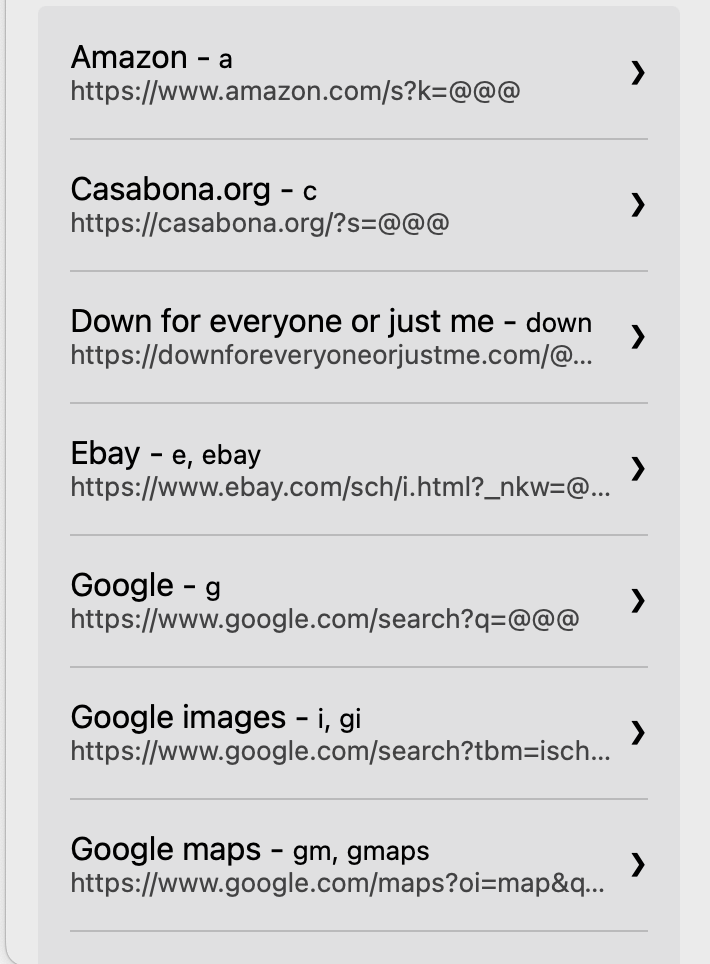
Keyword Search Extension
Some of the keyword searches I use.

But as you can see from the above screenshot, you can also add custom search. So I’ve added one for this site, as I’m often looking for links. I’ve also added one for searching Unsplash, and the LinkedIn Learning Library.

The only problem is, it appears, if you don’t use Safari you’re out of luck.

Using TextExpander Instead

There is another way though. If you use TextExpander*, you can get a decent replacement that is cross browser. Create a new snippet with the URL:

https://casabona.org/?s= and then a Single Text line fill in.

Expanding this will allow you to create the search URL. Then you can press Enter/Return. OR, you can simulate that click right in Text Expander. The final snippet will look something like this:

Search URL expansion in TextExpander

The only drawback is you’ll need to create separate snippet for each URL you want to search. You can join the Creator Crew to get my list in the Automation Library.

*Full disclosure: TextExpander is a current sponsor of my podcast, How I Built It.

Fast Searching!

Before this extension, I don’t think I realized how much I actually searched for stuff on places besides Google. It saves me a ton of time, and I know it will for you too.

Similar Posts

  • 7+ Ways To Learn Task Automation

    Something I say a lot is automation helps you cut away the things you don’t need to do, so you can focus more time on the actual tasks that require your attention. I also talk about tools I like using for automation. But where do you learn how to automate? Do you just try things…

  • Automating Saved Links with Pocket And Zapier

    Back before I decided to start automating more, the way I would compile my newsletters was to save links to Pocket and then on Monday mornings, scour them for what to share, create the links, and sum up the stories. I also had to be careful that I didn’t share the same link two weeks…

  • |

    Get Your Inbox Under Control (Automatically) with SaneBox

    Full Disclosure: SaneBox is a sponsor of my podcast, but boy do I love this tool. Have you ever seen someone’s phone and noticed an email notification badge with a 4 digit number (OR ARE YOU THAT PERSON)? It makes my skin crawl! My inbox serves as a todo list for me, so a lot…

  • Automatically Scheduling Podcast Guests with Calendly and Zapier

    Booking podcast guests can be a mess without the right tools. Missing one step can mean a bad recording, forgotten instructions, and unprepared interviewers. That’s why I’ve automated my entire guest booking process. I don’t forget anything, and I make sure guests are ready to record. Here’s how I do it.

  • Using a Mac mini as an Automation Server

    A warm welcome to Sheryl and Scott, our newest members! One of my biggest frustrations as an automator is reconciling iOS — my preferred mobile platform — with web apps. I wrote about it at the beginning of the month. Since then, I learned that Pushcuts, an iOS/iPadOS app that deftly bridges this gap, but…