How to Aggressively Guard Your Time and be More Productive
Tell me if this sounds familiar: you start in on a project. 5 minutes later you get an email. Maybe a phone call comes in (confirming you go the email, of-course). After that you start on the project again. Someone pings you on Slack. You chat with them until you realize you have a meeting in 5 minutes. After the meeting it’s lunch time. You get back and browse around for a bit – you have a meeting in 10 minutes anyway. Then more email. More Slack. More distractions. Suddenly it’s after 5pm, you feel like you did nothing, and you wonder where the day went. Sound familiar? It happens to me too much. That’s why I’ve been aggressively guarding my time. Here’s how.
A while back, I wrote about how I was trying to eliminate distractions so I can get more meaningful work done. In my opinion, meetings are a huge distraction. So here’s what I’ve been doing to keep meetings at bay and have more productive days.

Time Boxing is Key
The number one action I took towards guarding my time is time boxing. That means I set aside specific times for specific tasks. Most notably, I only record interviews or meet with people at certain times. And I group those meetings together.
I do this so that my day isn’t constantly interrupted or broken up. Usually it takes me 15-20 minutes after a meeting to get back into whatever I was doing. Similarly, if I know a meeting is coming up, I don’t want to get too deep into a task.
Specifically, I only record podcasts Monday afternoons, and Wednesday mornings. I think I’ll change that soon to make them all one day of the week.
I don’t meet at all on Fridays (or Tuesdays usually – more on that later).
Enforcing my Rules
So…what good is that if I don’t enforce that? No good at all! That’s why I always enforce my time boxes. Here’s how:
- I always send my Calendly link before another time is proposed. That way people can pick a time within my parameters.
- If someone just adds a meeting to my calendar (especially without asking me), I reject it outright. Then I propose times that work for me.
- If someone proposes a meeting, I always ask what the purpose is, and if we need to meet for it.
Let’s take a closer look at that last point for a minute: some people love meetings. And I’ll submit that sometimes a meeting is the best way to get things done. But not always. I want to make sure if I’m blocking time on my calendar to discuss something, it’s worth forgoing other work I would have done. I did this even when I was not self-employed — and usually framed it as, “If we have this meeting and it’s not necessary, I will not get this project done on time.”
This Might Seem Inflexible.
I was worried that I looked inflexible doing this. There’ve been instances were people asked to be on my podcast, and they couldn’t do my times so it didn’t work out.
But the reason I guard my time so closely is so I can actually get work done – or spend time with my family. In the above example, not only did one person pitch me on coming on my show, but they could only meet in the evenings. Unfortunately that doesn’t work for me because that’s family time.
Be More Flexible when it Makes Sense
Conversely, if I ask to be on someone’s podcast, or ask someone to come on my show, I’m more flexible because they are accommodating me and I want to play by their rules.
The same thing goes with meetings. I said I don’t meet on Tuesdays – but I have one on Tuesday afternoons for WordCamp Philly planning. That’s the time when everyone could meet, so I made an exception, know it’s only temporary.
Knowing Your Calendar is Key
Knowing my calendar for the week helps me plan out everything I’m doing work wise. I can get an idea for how much I’ll get done. And knowing that meetings are contained help me set large blocks of time to do meaningful work. But it’s not perfect.
Having a Single Day for Tasks
In the near future, I’m going to rework my schedule such that:
- All of my podcast interviews are one day
- All of my meetings are one day
This will be tough, but it will go a long way in improving my productivity. Pat Flynn calls this “batching” and I love the idea. It means you don’t have to switch contexts as much, which means deeper work.
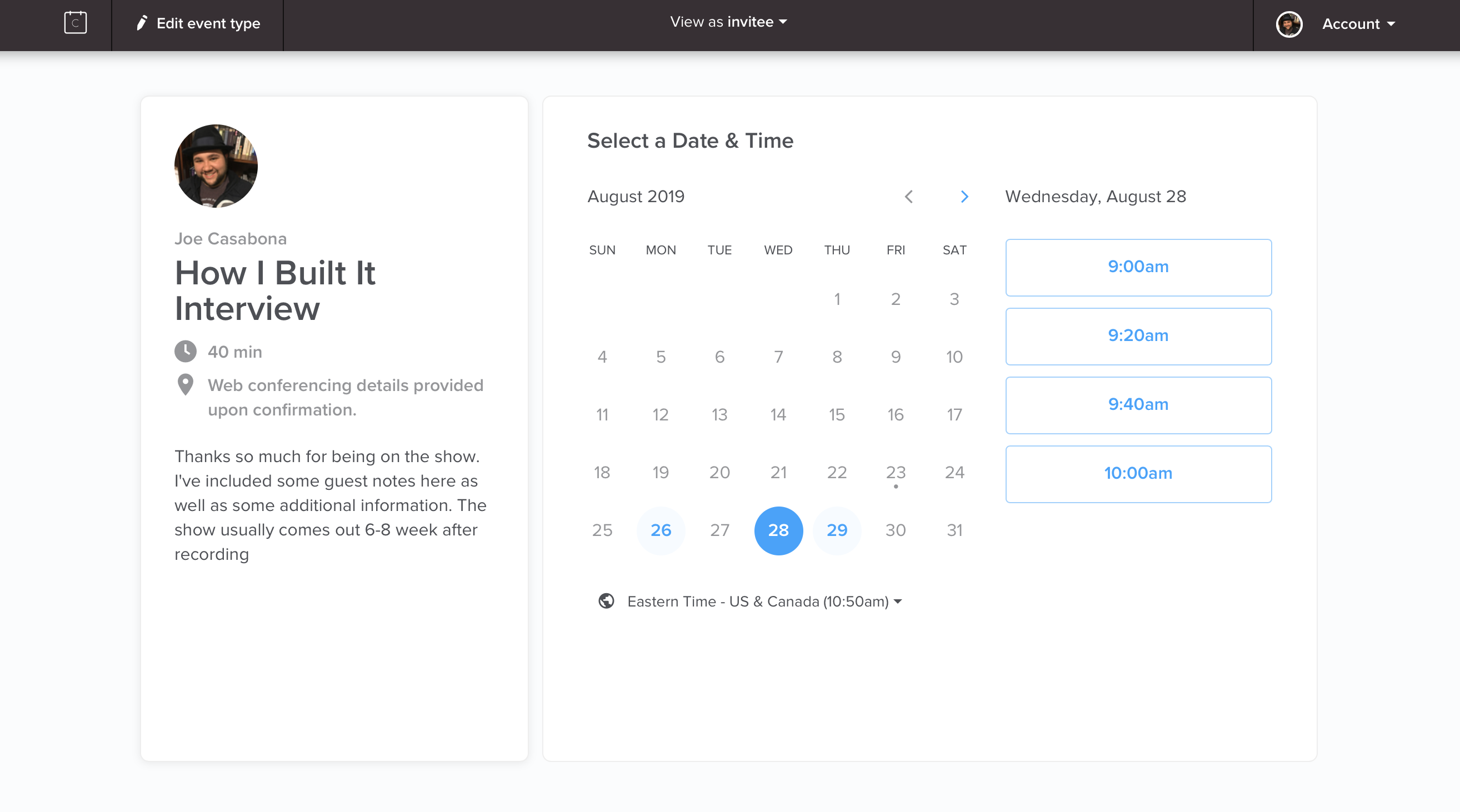
Calendly is a BIG Help!
If you’re looking for a quick win for guarding your time, try out Calendly. It free to start and you can:
- Define meeting blocks
- Set buffer times before and after meetings
- Automatically have the time zone converted
- Create meetings in Zoom (or other meeting software)
I moved to the paid plan so I can have multiple calendars and more integrations.
How Do You Guard Your Time?
Let me know in the comments! Everyone is different and I’d love to hear the ways you stay productive and protect your time.