
USA Today, WSJ, and NYT iPad Apps
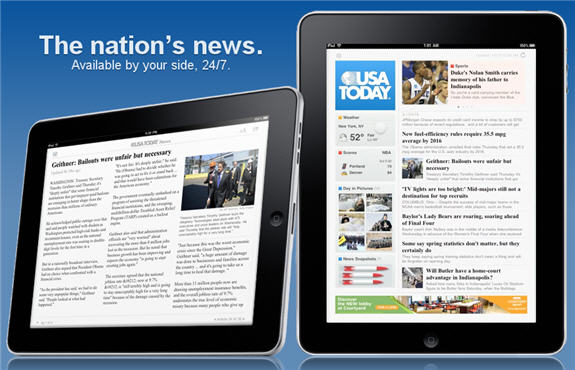 Earlier in the week I said the iPad is best for consuming information, so it only makes sense that I’d mention the top three news apps for it: USA Today, Wall Street Journal, and NY Times. I haven’t used all of  them extensively though I did want to compare some of the basic features of each. I’ll cover: how intuitive the apps are to use, how much content they make available, and how well they integrate the ability to share stores on Facebook & Twitter.
Usability: They are all pretty intuitive to use. Swipe to view more stories, press button to view different sections. As far as overall design, I’d say  NYTimes is the nicest design, adapting well to the iPad’s User Experience (UX). USA Today’s looks a lot like the newspaper itself which is cool, though only one part of the screen is scrollable, which causes some confusion. Navigating sections also isn’t as intuitive as in the NYTimes. I feel the WSJ app is pretty cluttered, though it does present the easier way to switch sections, which you can do by swiping up and down (as opposed to pressing a logo or bottom corner). Left and right swipes allow you to move through the current section. Even though USA Today has a slightly higher learning curve than the others, I actually like this app the best because it presents the information I care about the most right when you boot the app up (top stories, weather, scores). I also like the typography/overall screen design the best on USA Today.
Available Content: WSJ far and away offers the most content, but you need to pay for a subscription to access it. They’ll offer several back issues, the current issue (as it was published that day), and an updated version of the current issue throughout the day. NYT and USA Today operate more like the website in this regard, constantly updating the current version when new news is published. WSJ also allows you to save articles, sections, and watch stocks. USA Today allows you to add the weather to multiple cities, & your favorite sports for scores to the home screen. As far as I could tell, with NYT, what you see is what you get (though the app does ask for access to your location). WSJ wins this round as far as available content, but USA Today wins for custom content.
Ability to Share: Both USA Today and NYT offer the same sharing feature- Email, Facebook, Twitter, and Copy Link. This makes using these apps great because I love to share stores on social networks (my friends and followers know this). WSJ on the other hand, only allows you to email and save stories. That’s a big downside of the app for me. USA Today & NYT tie here.
Overall: I like USA Today’s app the best. The UX, sharing info, and customizing some info are the best in my opinion. I also happen to like the content in USA Today the best. Finally, it looks like USA Today’s content will remain “the most” free for the longest. WSJ is already charging for older content, and NYT makes you register to gain access to all content (free as of now, which will probably change in 2011). USA Today has no indications of charging for content built into the app. If you had to choose one, I’d recommend the USA Today app.